
How to Track ChatGPT, Perplexity & Gemini Conversions, Not Just Mentions

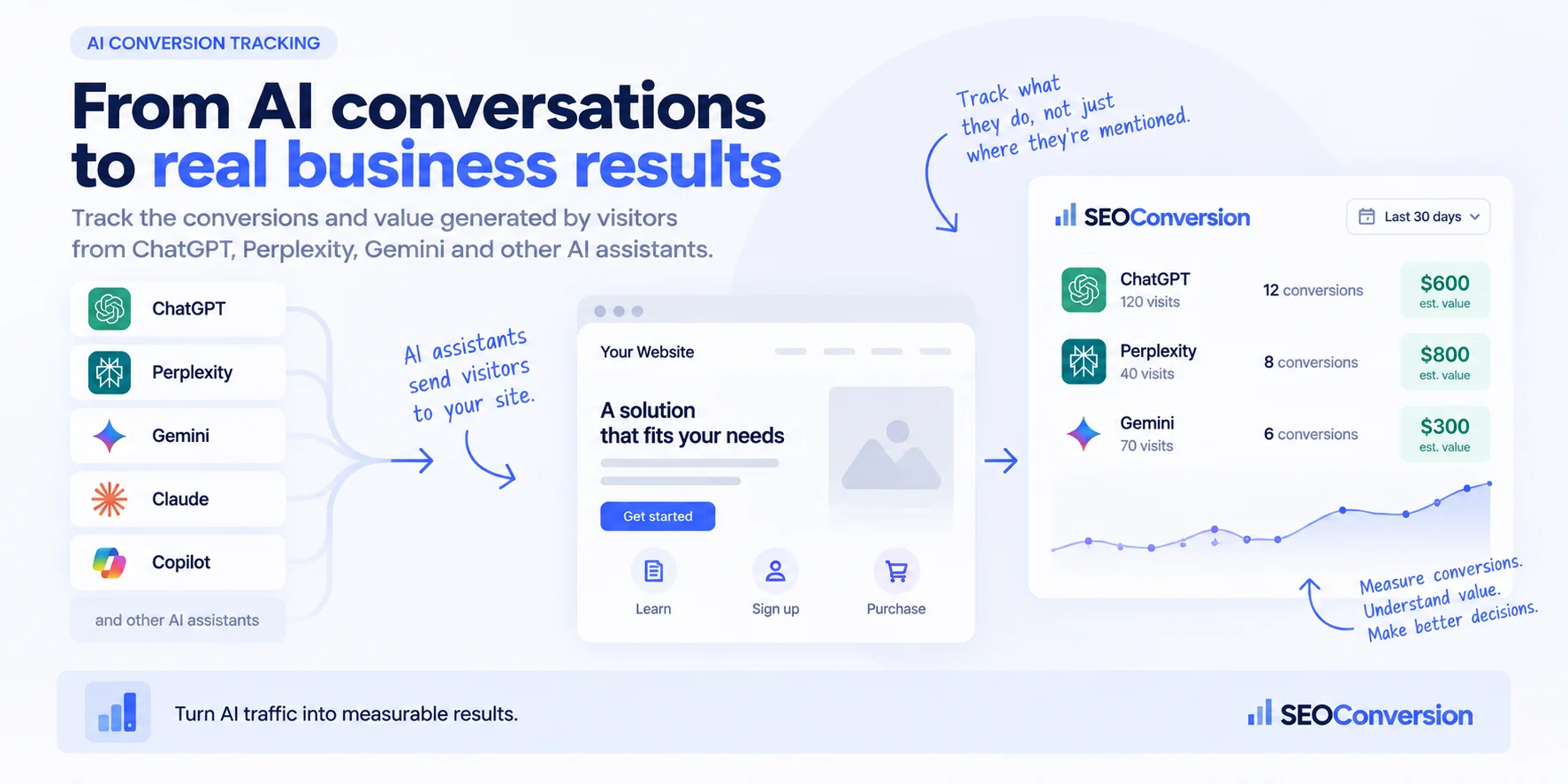
People are starting to ask ChatGPT, Perplexity, and Gemini the same questions they used to type into Google. Some of those conversations end with a click straight through to a website. That’s a real visitor, on a real page, doing real things once they arrive.
If the terms AEO and GEO are new to you, What Is AEO & GEO? A Practical Guide covers what they mean and how they differ from traditional SEO before diving into measurement here.
For a broader side-by-side comparison, AI Search vs Traditional SEO: What Actually Changes for Measurement breaks down what stays the same, what changes, and why visibility alone doesn’t answer whether it converts.
Most sites don’t have a clear view of what happens after these visitors arrive. AI referrals may appear under different channels depending on the signals available, which makes conversion reporting harder to interpret.
AI conversion tracking connects identifiable referral traffic from assistants such as ChatGPT, Perplexity and Gemini to the actions visitors take after they reach your site.
It lets you measure AI referral visits, conversions, landing pages and associated value instead of stopping at brand mentions or citation counts.
Not every AI influenced visit can be identified. If a visit arrives without a recognizable referrer or source signal, its original AI source may be impossible to recover.
Why AI Assistant Traffic Needs Its Own Tracking
Standard analytics tools sort traffic into channels based on the signals available when someone arrives on your site. AI referrals don’t always provide enough information to identify their original source, so some visits can end up classified as Direct or Referral instead of AI traffic. Privacy-first tools share this gap, as the Plausible and Fathom comparison shows.
AI assistants are becoming a genuine source of traffic for a lot of sites, and traffic you can’t see is traffic you can’t improve, defend, or report on.
How AI Assistants Actually Send You Traffic
The mechanic is simple. Someone asks an AI assistant a question, the assistant’s answer references or links to a page on your site, and they click through. From that point on, it’s a normal visit: they land on a page, they browse, and they might convert.
SEOConversion checks for these signals at the start of the session, across ChatGPT, Perplexity, Claude, Gemini, Copilot, and others. When one of those signals is recognized, SEOConversion classifies the session as AI search traffic rather than Direct or Referral.
Where This Can Still Fall Through
No tool that relies on a referrer or a UTM tag catches every single AI-assisted visit, and it’s worth being upfront about that.
A visit falls through to plain “Direct” traffic when there’s no referrer and no recognized utm_source. That happens more often than you’d expect: some in-app browsers, including the one inside the ChatGPT iOS app, strip the referrer entirely. Someone can also copy a link out of a chat and paste it into a new tab instead of clicking it, which leaves no referrer and no UTM tag to detect. And a newer or regional AI assistant that isn’t yet on the recognized list will land as referral or direct rather than as its own channel.
None of this is unique to SEOConversion. Any classification built on referrer and UTM data hits the same wall eventually. What changes between tools is how they classify the AI referral signals that are actually available, not whether every visit can be perfectly identified.
Being Mentioned Isn’t the Same as Converting
An AI mention tells you that your brand appeared in an answer. It doesn’t tell you whether someone clicked through, converted, or generated value after that mention. This page focuses on that second question. For a full breakdown of how visibility tracking and conversion tracking differ, see SEOConversion vs AI Visibility Trackers.
How to Track Conversions from ChatGPT and Other AI Assistants
Tracking this properly means treating AI referrals as their own channel from the first visit through to revenue. Here’s what that looks like in practice.
Step 1: Identify AI Referral Traffic
Start by recognizing the visit for what it is. That means checking the referrer and any utm_source tag against a list of known AI assistants when the session begins, the same mechanism covered above, with the same limits. Skip this step and every AI-driven visit just blends into whatever bucket your analytics defaults to.
Step 2: Keep AI Referrals Separate From Organic Search
Once a visit is recognized as coming from an AI assistant, don’t merge it back into Organic Search reporting. They are different acquisition sources, and combining them makes it impossible to see how each one contributes to traffic, conversions and value. Treat AI search as its own channel end to end rather than as a subcategory of organic.
Step 3: Track Meaningful Conversions
Whatever the AI assistant sent you, the visit only matters if something happens next: a purchase, a signup, a lead, a demo request, a click on a high intent CTA. This is the same conversion tracking that applies to any channel, covered in full in SEO Conversion Tracking: Measure Conversions and Value from Organic Search.
Step 4: Attach Actual Revenue or Estimated Conversion Value
A conversion count on its own doesn’t tell you much. Attaching a real transaction value, or an estimated conversion value based on how often that action turns into a customer, turns a count into a number you can compare across channels. The formula for that is in How to Calculate the Value of a Lead or Conversion.
Step 5: Compare Assistants and Landing Pages
Once conversions and value are in place, break the results down by which assistant sent the visit and which page it landed on. The same landing page logic covered in Organic Conversion Attribution applies here, just applied to AI-driven visits instead of organic ones.
What AI Conversion Metrics Should You Track?
A handful of numbers matter more than the rest once AI referrals are being tracked properly: AI referral visits, AI conversions, AI conversion rate, conversions by assistant, conversions by landing page, actual revenue, and estimated conversion value. Together, these tell you not just that AI assistants are sending traffic, but which ones, to which pages, and what that traffic is actually contributing.
Which AI Assistants Should You Track?
At minimum, the major ones people actually use to ask product and research questions: ChatGPT, Perplexity, Claude, Gemini, and Copilot. Each one can send meaningfully different traffic, and tracking them as one lump “AI” bucket hides which assistants are actually worth paying attention to.
What This Looks Like in Practice
Here’s a hypothetical example. Say ChatGPT sends 120 identifiable visits to your site in a month, and 12 of them convert, for $600 in estimated conversion value. Perplexity sends only 40 identifiable visits, but 8 convert and contribute $800 in estimated conversion value.
Traffic alone makes ChatGPT look like the larger source. Conversion data adds another part of the story: in this example, Perplexity sends fewer visitors but contributes more estimated conversion value.
That’s the point of AI conversion tracking. The goal isn’t simply to count visits from AI assistants. It’s to understand what identifiable AI referral traffic does after it reaches your site.
If you’re a consultant or agency running this across several client sites, the setup is the same one covered here, just repeated per client. See SEO Conversion Tracking for Agencies for what that looks like managed from a single account.
If you’re on a SaaS marketing or growth team, see SEO Conversion Tracking for SaaS for how trial signups, demo requests, and paid signups from AI referrals get detected and valued.
FAQ
Does ChatGPT actually send traffic to websites?
Yes. When an AI assistant references or links to a page in its answer, a click on that link is a normal website visit, just like clicking a link in search results.
How do I know if a visitor came from an AI assistant?
SEOConversion checks the referrer and utm_source when a session starts and compares those signals with known AI sources. When a recognized signal is present, the session can be classified as AI search traffic. If both are missing, the original AI source can't reliably be identified, and the visit may appear as Direct.
Do AI assistants pass a referrer like Google does?
Not consistently. That's exactly why this traffic tends to get miscategorized as direct or referral in most analytics setups.
Is AI search traffic worth tracking separately from organic search?
If you want to know whether your content strategy is working across both, yes. Blending the two together hides which channel is actually driving results, and which one might just be inflating a "Direct" number that looks fine for the wrong reasons.
Can the same landing page get both organic and AI search conversions?
Yes, and it's common. A page can rank well in traditional search and also get cited by AI assistants. Tracking both separately shows you which channel is actually contributing, instead of crediting one for the other's results.
You've been mentioned. Now find out if it converted.
SEOConversion tracks the conversions and value that ChatGPT, Perplexity, Gemini and other AI assistants send to your site, not just how often you’re mentioned.
Start free