
Dark Traffic: What It Is, Where It Hides and How to Measure It

Dark traffic is visits to your website that came from a real source, such as a link shared in WhatsApp, a click in an app or an answer from an AI assistant, but arrived without a referrer or campaign tags, so your analytics cannot tell where they came from. GA4 and most other tools file those visits as Direct. The traffic is real and often valuable; the problem is that the channel that earned it gets no credit.
This guide covers where dark traffic comes from, how it differs from direct traffic and dark social, the leaks you can fix, how to estimate the rest, and a worked example that turns dark sessions into conversions and dollars. (If you searched for a dark traffic signal on the road, that is a signal with no power; follow the rule in your state’s driver handbook. This page is about web analytics.)
What Is Dark Traffic?
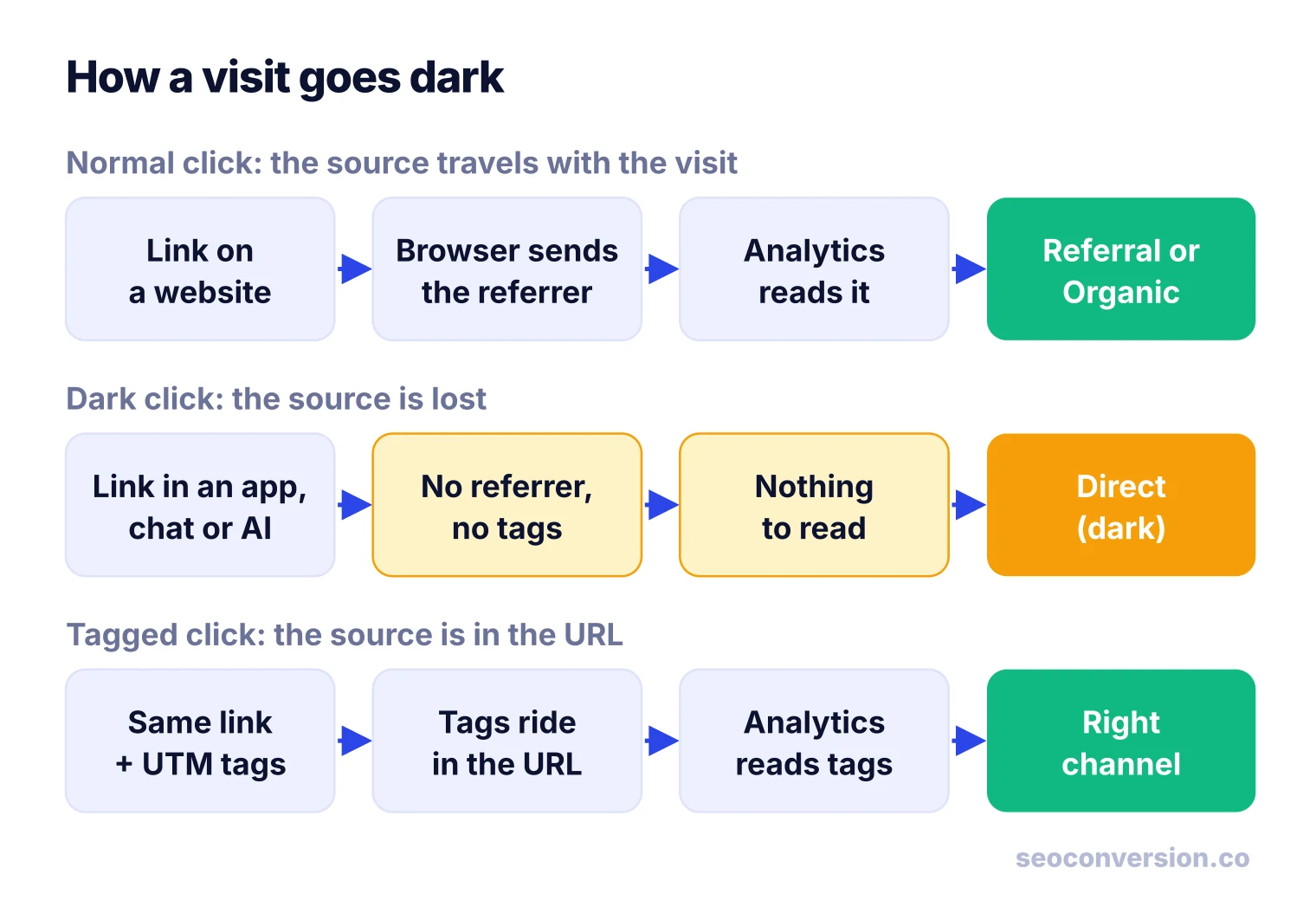
Every analytics tool decides where a visit came from with a few signals present when the session starts: the referrer the browser sends (the address of the page the visitor clicked from), UTM tags on the URL, and ad click IDs. Dark traffic is what happens when a visit had a source but none of those signals survived the trip. With nothing to classify, the tool falls back to its leftover bucket.
In GA4 that bucket is the Direct channel. Google’s default channel group defines it as visits that arrive via a saved link or by entering your URL, and the rule behind it is mechanical: the source is “(direct)” and the medium is “(none)” or “(not set)”. GA4 cannot tell a person who typed your address from a person who tapped your link in Slack. Both look the same.
The idea grew out of dark social, the term Alexis Madrigal coined at The Atlantic for links shared in email and chat. Analytics vendors later widened it to “dark traffic” because private sharing is only one of several ways a source gets lost. Apps, AI assistants, broken redirects and offline campaigns all produce the same blank.
Where Dark Traffic Comes From
Most dark traffic falls into five groups. The first four are visits with a lost source; the fifth is a visit caused by something you never saw.
| Source | Examples | Why it goes dark |
|---|---|---|
| Private sharing (dark social) | WhatsApp, iMessage, Slack, Teams, email apps | Many messaging and email apps open links without a referrer |
| Apps and in-app browsers | Social apps, news apps, podcast show notes | An app is not a web page, so it has no page address to pass on, and many apps send none |
| AI assistants | Links clicked or copied out of ChatGPT, Perplexity, Claude, Gemini, Copilot | Some assistant apps open links without a referrer; copied URLs never have one |
| Technical loss | HTTPS to HTTP links, redirects and shorteners, noreferrer links, untagged pages | The source existed but was stripped on the way, often by your own setup |
| Offline and word of mouth | Print, events, podcasts, a colleague saying your name | The person types your URL later, so the visit is real Direct even though a campaign caused it |
Google lists several of these in its own help page on (direct) / (none) traffic: links without UTM parameters, redirects and URL shorteners that drop referral details, typed URLs, links in offline documents such as PDFs and Word files, and ad blockers interfering with tracking.
Dark Traffic vs Direct Traffic, Dark Social and the Dark Funnel
Four terms get used as if they were the same. They are not, and mixing them up leads to the wrong fix.
| Term | What it is | Produces a visit? | What you do about it |
|---|---|---|---|
| Direct traffic | A report bucket: every visit with no referrer, tags or click ID | Yes | Read it by landing page; it mixes genuine and dark visits |
| Dark traffic | The part of Direct (and sometimes Unassigned) that had a real source you could not see | Yes | Fix leaks, tag links, estimate the rest |
| Dark social | One cause of dark traffic: links shared privately | Yes | Make shares traceable; ask buyers |
| Dark funnel | Influence you cannot observe: AI answers, communities, podcasts, conversations | Often not | Watch branded search, self-reported source and conversions |
So dark traffic is narrower than Direct, wider than dark social, and different in kind from the dark funnel. Our guide to what direct traffic means covers the whole Direct bucket, including the genuine part.
Why the Source Goes Missing
A browser sends the referrer only when one web page links to another. The default rule, strict-origin-when-cross-origin, sends the linking site’s origin on a cross-site click, which is enough for your analytics to log a referral, according to MDN’s Referrer-Policy reference. Three things break that chain:
- There is no linking page. A native app, an email client or a document is not a web page, so there is nothing to send unless the app adds it.
- The linking page opts out. A
no-referrerpolicy orrel="noreferrer"on a link tells the browser to send nothing. - The security level drops. A click from an HTTPS page to an HTTP page sends no referrer under the default policy.
UTM tags are the workaround because they travel in the URL itself, not in a header the app or browser controls. When a link carries them, the visit is classified correctly no matter how it was opened.
Why Dark Traffic Matters
Dark traffic does not lose you visitors. It loses you the evidence of what brought them, and that changes decisions:
- SEO and content look weaker than they are. Someone reads your guide in an AI answer or a newsletter, comes back days later by typing your name, and converts. The report credits Direct or branded search, not the content that did the work.
- Attribution reports drop it. GA4’s attribution models give Direct no credit unless the whole path is Direct, so conversions from dark visits are credited to whatever tracked touch came earlier, or to nothing you can act on. The direct traffic guide walks through that rule.
- Budgets drift toward easy-to-track channels. Paid search with auto-tagging is always visible. Word of mouth and AI recommendations are not. Without an estimate, the visible channel wins every budget meeting.
- Spikes get misread. A jump in Direct after a launch can be a viral share in group chats, a broken redirect or a bot. Each needs a different response.
How to Measure Dark Traffic in 6 Steps
You cannot see a private conversation, and you should not try. You can shrink the part caused by your own setup, then estimate the remainder with signals that do leak through.
Step 1: Fix the leaks first
Before estimating anything, rule out technical causes. They are common, they are fixable, and they inflate Direct in ways that look like word of mouth. The table in the next section lists the usual ones with a test for each.
Step 2: Tag every link you control
Add utm_source, utm_medium and utm_campaign to every link you publish outside your site: email, social posts, QR codes, PDFs, slide decks, podcast show notes, partner and affiliate links. Use lowercase and one naming list so GA4 maps them to the right channel. Share buttons on your own pages can add tags too, which turns some private sharing into tracked visits.
Step 3: Split Direct by landing page
In GA4, open Reports, Acquisition, Traffic acquisition, filter the session default channel group to Direct, and add landing page and new/returning as dimensions (or build the same view in Explore). Then sort sessions into two piles:
- Likely genuine: the homepage, login and account pages, and short URLs people can type or bookmark.
- Likely dark: new users landing on long, deep URLs such as blog posts, product pages and docs. People rarely type those from memory.
Step 4: Compare with signals that leak through
Some dark activity shows up indirectly. Branded queries in Search Console rise when people hear about you elsewhere. The GA4 AI Assistant channel shows the AI visits that kept their referrer, which tells you which pages assistants recommend. A Direct lift on one page right after a newsletter mention or a community thread points to where the dark share came from. For the branded side, see branded vs non-branded traffic.
Step 5: Ask people where they heard about you
Add an optional, open text field, “How did you hear about us?”, to your lead forms and checkout. It is the only measure that reaches into private channels, because the person tells you. Keep it free text rather than a dropdown, since dropdowns steer answers toward the options you thought of, then group the answers monthly into a few buckets: a colleague or friend, an AI assistant, search, social, other.
Step 6: Put conversions and value on it
Sessions are not the goal. Count the conversions that came from likely dark sessions, give each conversion a value, and split that value using your survey answers. Our guide on how to calculate conversion value covers the value side. The worked example below runs the whole process.
Dark Traffic You Can Fix: Failure Modes and Tests
Each row below is a way your own setup creates dark traffic. Check them in this order; the first two are the most damaging.
| What you see | Likely cause | How to test | Fix |
|---|---|---|---|
| Almost all referrals show as Direct | Site or some pages still on HTTP | Load an old HTTP URL and see if it redirects | Move fully to HTTPS and 301 every HTTP URL |
| Tagged campaigns show as Direct | A redirect or shortener drops the query string | Click the live link and check the final URL still has utm_ tags | Preserve the query string on redirects; test shorteners |
| Direct spikes on one page with near-zero engagement | Bots or uptime monitors | Check engagement rate, city and browser for that page | Filter known bots; exclude monitors |
| Direct landing pages you never link to externally | Your team, staging or QA visits | Filter by internal IP or a team cookie | Define internal traffic in GA4 and filter it |
| Partner links show as Direct | Partner uses noreferrer or a no-referrer policy | Inspect the link HTML and the partner response headers | Ask for tagged links |
| Sessions start mid-funnel as Direct | A page without the tag sits between entry and the tracked page | Crawl for pages missing the tag | Add the tag to every template |
| Unassigned sessions grow | UTM medium values that match no channel rule | List source/medium for Unassigned | Standardize medium values (email, social, cpc, referral) |
Worked Example: Sizing Dark Traffic and Its Value
All numbers in this example are illustrative. A B2B software site has 40,000 sessions in a month. GA4 reports 12,000 of them as Direct, 30% of the total.
- Remove noise. 600 Direct sessions come from internal IPs and an uptime monitor. That leaves 11,400.
- Set aside likely genuine Direct. 4,400 sessions land on the homepage, login and pricing, mostly returning users.
- The rest is likely dark. 11,400 − 4,400 = 7,000 sessions, mostly new users on blog posts and comparison pages. That is 61% of the cleaned Direct bucket, and 7,000 / 40,000 = 17.5% of all sessions.
- Count conversions. Those 7,000 sessions produced 140 demo requests, a 2% conversion rate.
- Value them. At $90 per demo request, that is 140 × $90 = $12,600 a month that no channel report credits.
- Split by what people said. The 140 leads answered the “How did you hear about us?” field: 49 a colleague or a shared link (35%), 42 an AI assistant (30%), 28 search (20%), 21 other (15%).
Applying those shares to the 7,000 dark sessions gives roughly 2,450 from shared links, 2,100 from AI assistants, 1,400 from search and 1,050 from other sources. That step assumes leads and non-converting visitors came from the same mix, so present it as an estimate, not a count.
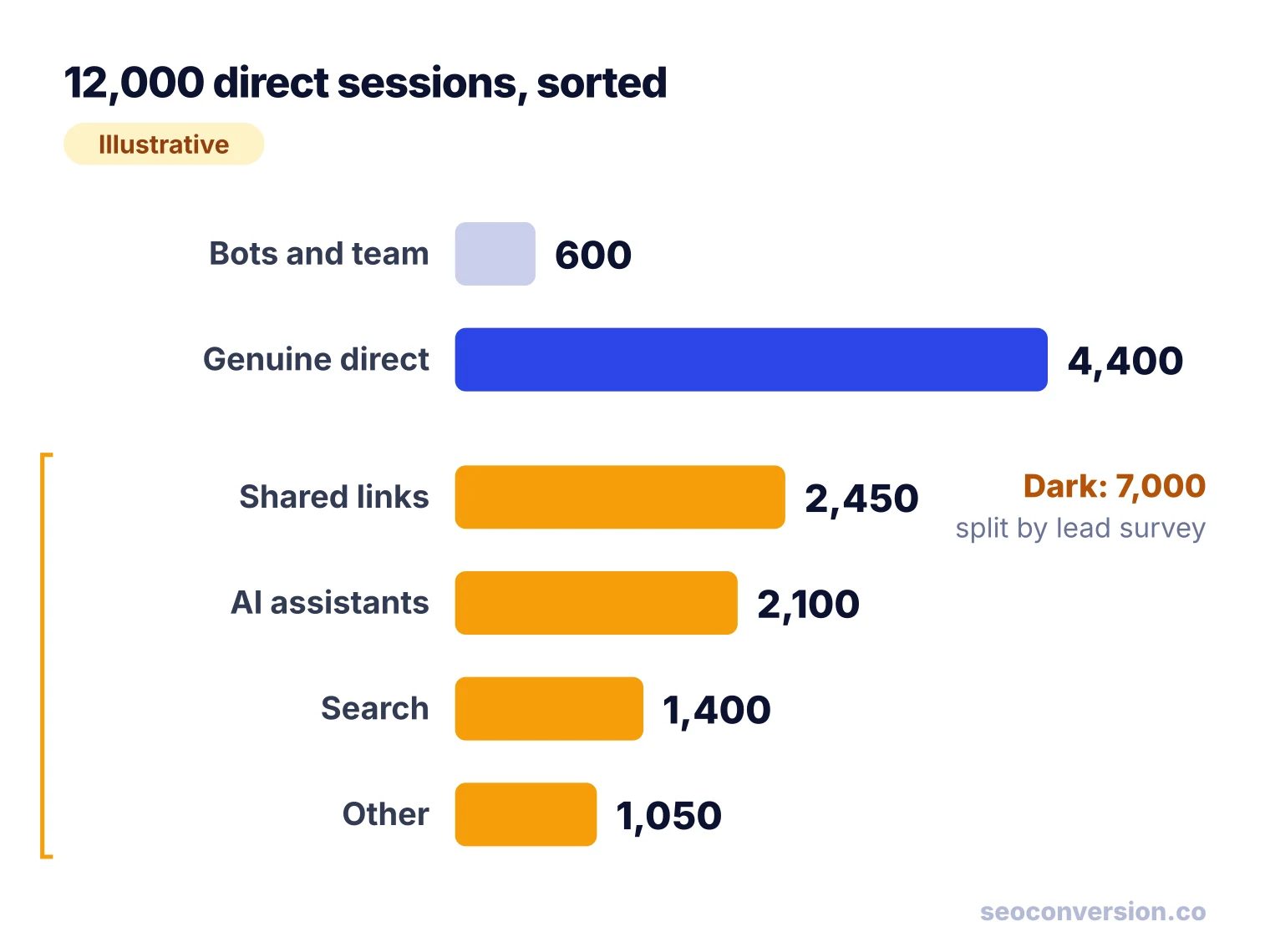
The result changes the conversation. The AI assistant share alone, $3,780 a month in this example, is invisible in the channel report, and so is the $4,410 from people passing links around. Neither number is exact, but both are better than the zero the report shows.
Rerun the split each month with the same rules. If likely-dark sessions rise after you publish or get mentioned, and the survey shares move the same way, the estimate is tracking something real. If Direct rises with no change in survey answers or branded search, go back to the failure modes table.
AI Assistants: The Newest Source of Dark Traffic
GA4 now has an AI Assistant channel. Per Google’s default channel group documentation, it covers visits from sources like ChatGPT, Gemini, Deepseek, Copilot and Grok, and GA4 sets the medium to ai-assistant only when the referrer matches its list of AI assistants. Two consequences follow:
- No referrer, no AI Assistant channel. An AI visit that arrives without a referrer still lands in Direct. The channel measures the visible part only, so treat it as a floor.
- Google’s own AI features are excluded. Clicks from AI Overviews and AI Mode count as Organic Search, not AI Assistant.
One signal survives a stripped referrer: a tag the assistant adds itself. ChatGPT links often carry utm_source=chatgpt.com, which keeps those visits out of Direct. For the full setup, including a custom channel for assistants GA4 misses, see AI conversion tracking. SEOConversion identifies AI visits from referrals and supported UTM signals and reports their conversions and value by landing page; when an assistant sends no referrer, the visit stays Direct rather than being guessed.
What to Report When You Cannot See the Source
Traffic by channel is the wrong scoreboard for anything that runs partly in the dark. Report these instead, side by side, every month:
- Conversions and value by landing page, across all channels including Direct. A guide that drives demos keeps driving them whether the click was tracked or not. This is the core of SEO conversion tracking.
- Measured plus estimated for each channel: for example (illustrative), “AI assistants: 300 measured visits plus an estimated 2,100 dark visits.” Keep the two numbers separate so nobody mistakes the estimate for a count.
- Self-reported source shares from the form field, with the number of answers behind them.
- Branded search trend from Search Console, as the footprint of demand created elsewhere.
A simple rule for decisions: never cut a channel on attributed numbers alone if its landing pages keep converting through Direct. Check the landing-page view first.
If you want the landing-page view without building it by hand, SEOConversion records conversions and their value from organic search and AI assistants on each landing page, with a one-line script and no cookies.
FAQ
What is dark traffic in simple terms?
Dark traffic is real visits to your site whose source your analytics cannot see. The click came from somewhere, such as a chat message, an app or an AI assistant, but it arrived with no referrer and no campaign tags. Tools like GA4 then file it as Direct, which hides the channel that actually sent it.
Is dark traffic the same as direct traffic?
No. Direct is the bucket in your report; dark traffic is the part of that bucket that came from a real source you could not see. Direct also holds genuine typed visits and bookmarks, plus bots and your own team. Dark traffic can also sit outside Direct, for example in Unassigned when tags are malformed.
Is dark traffic bad?
The visits are usually good: shared links and AI recommendations often bring motivated people. What hurts is the reporting. Channels that send dark traffic get no credit, so SEO, content and AI visibility look weaker than they are and budgets drift toward channels that are easy to track.
Can Google Analytics track dark traffic?
Not directly. GA4 classifies a visit from its referrer, UTM tags and ad click IDs, and dark traffic has none of them, so it lands in Direct. GA4 helps you estimate it: segment Direct by landing page and new users, check the AI Assistant channel for the share it can see, and compare with branded search in Search Console.
How much of my traffic is dark?
Nobody can give you a universal percentage; it depends on your audience, apps and how many of your links are tagged. Estimate your own: remove bots and internal visits from Direct, set aside visits to the homepage and login pages, and treat Direct sessions from new users on deep pages as likely dark. The worked example in this guide shows the arithmetic.
What is the dark funnel?
The dark funnel is the research and influence that happens where you cannot observe it: AI answers, private communities, podcasts, conversations. Unlike dark traffic, much of it never produces a visit at all. You see its effects later, as branded searches, typed visits and leads who say they heard about you somewhere you never tracked.
See which landing pages convert, tracked or not.
SEOConversion records conversions and their value from organic search and AI assistants on each landing page, with one script and no cookies. When an assistant sends no referrer, the visit stays Direct rather than being guessed.
Start free