
Conversion Tracking Tools: Types, Free Options and How to Test Them

Conversion tracking tools record when a visitor does something valuable on your site, like buying, filling out a form or calling, and store where that visitor came from. The core set is a web analytics tool (often Google Analytics 4), the conversion tags of each ad platform you pay for, and your CRM or order system as the record of what really happened. Heatmap and A/B testing tools help you improve the conversion rate, but they are not what counts conversions.
This guide sorts the tool types, shows how each one captures data and where it loses it, gives a stack for each kind of business, and walks through a capture-rate audit so you can test a tool against your own sales before you trust its numbers.
What Conversion Tracking Tools Do
Every conversion tracking tool does three jobs. It detects the action (a thank-you page load, a form submit event, a purchase webhook, a call). It attaches context: the landing page, the referrer, the campaign tags or click ID, the order value. And it reports the result as counts and value by channel, campaign or page. If you want the concept from the ground up, read what conversion tracking is and how it works.
Two kinds of conversions matter. Macro conversions are the goal itself: a purchase, a demo request, a signed contract. Micro conversions are steps toward it: an add to cart, a newsletter signup, a click on a pricing button. Track both, but give the macro ones the most weight and a real value.
Conversion Tracking Tools vs CRO Tools
Search for this topic and most results are lists of conversion rate optimization (CRO) tools. The two overlap but answer different questions:
| Conversion tracking tools | CRO tools | |
|---|---|---|
| Question they answer | How many conversions, worth how much, from where? | Why are visitors not converting, and does a change help? |
| Examples | GA4, Google Ads tag, Meta Pixel and Conversions API, call tracking, CRM | Hotjar, Microsoft Clarity, Crazy Egg, VWO, Optimizely, AB Tasty |
| Output | Counts and value by channel, campaign, landing page | Heatmaps, recordings, survey answers, test winners |
| If it breaks | Budgets and SEO decisions rest on wrong numbers | You lose insight, but your totals stay correct |
CRO tools fall into a few families: heatmaps and session replay (Hotjar, Microsoft Clarity, Crazy Egg, FullStory), A/B testing (Optimizely, VWO, AB Tasty), on-site surveys and feedback, personalization and pop-ups, landing page builders (Unbounce, Instapage, Leadpages) and usability testing panels. Every one of them depends on conversion tracking: an A/B test result is only as good as the conversion event it counts. Set up tracking first.
Types of Conversion Tracking Tools
| Type | Examples | What it records | Blind spot |
|---|---|---|---|
| Web analytics | GA4, Adobe Analytics, Matomo, Plausible, Simple Analytics | On-site conversions by source, page, device | Calls and offline deals; visits blocked by browsers or consent |
| Product analytics | Mixpanel, Amplitude, Heap | In-app events, funnels, retention | Marketing channels beyond basic UTM data |
| Ad platform tags | Google Ads tag, Meta Pixel, Microsoft UET, LinkedIn Insight Tag | Conversions after that platform’s ads | Everything that did not touch their ads |
| Tag managers | Google Tag Manager | Nothing by itself: it deploys and fires other tags | Breaks silently when the site changes |
| Server-side delivery | Server-side GTM, Conversions APIs, store apps | Orders and leads sent from your server | Setup and hosting effort |
| Call tracking | CallRail, CallTrackingMetrics | Phone calls by source, keyword, page | Calls to numbers it does not swap |
| CRM and offline import | HubSpot, Salesforce, Pipedrive | Qualified leads, deals, revenue | The first visit, unless the source is passed in |
Web analytics
The center of most setups. GA4 is free and records any event; you then mark the important ones as key events. Google now separates the terms: a key event is an action that matters to your business, and a “conversion” is a key event you share with Google Ads to measure and bid on campaigns (see Conversions vs. key events in Google Analytics). Adobe Analytics covers the same ground for large companies with analysts to run it. Privacy-focused tools such as Plausible, Simple Analytics and Matomo are simpler to set up: you add a script, fire a named event on the action, and turn the event into a goal. For setup steps in GA4, see the Google Analytics conversion tracking guide; for other options, the GA4 alternatives guide.
Product analytics
Mixpanel, Amplitude and Heap track what signed-in users do inside an app: which features lead to an upgrade, where trials stall. They suit SaaS teams. Their marketing source data is thinner, so pair them with web analytics or a CRM for channel reporting.
Ad platform tags
Each ad platform has its own tag that reports conversions back so its bidding can optimize. You need one per platform you spend on. These tags only see their own ads, and each one gives itself credit for any conversion its ads touched, so their totals overlap.
Tag managers
Google Tag Manager is free and lets you add or change tags without a code release. It does not record conversions itself. Its risk is silent failure: a renamed button or a new form plugin can stop a trigger from firing, and nothing tells you.
Server-side delivery
Instead of relying on the visitor’s browser, your server sends the conversion directly to the tool. Meta says events sent through its Conversions API are used for measurement, reporting and optimization the same way as Pixel events, and it asks you to confirm that events are deduplicated when you send both. Ecommerce platforms offer apps that do this from the order webhook. Our server-side GTM guide covers cost and setup.
Call tracking
Call tracking tools swap the phone number on your site per source or per visit, so a call can be tied to the search, ad or page behind it. For local services, calls are often the main conversion, and none of the other tools will count them.
CRM and offline import
A form fill is not revenue. Your CRM knows which leads became customers and for how much. Passing the source, landing page and click ID into a hidden form field lets you report revenue by channel and send closed deals back to ad platforms. Google’s enhanced conversions do this with first-party data such as email, hashed with SHA256 before it is sent, in a version for web sales and one for leads that close offline. See offline conversion tracking for upload windows and an example.
Behavior and CRO tools
Heatmaps and recordings sit on top of the stack. Microsoft Clarity is free; Hotjar and Crazy Egg have free or low-cost entry plans. Use them after the numbers show you where people drop off, to see why.
How Conversion Tracking Tools Capture Data
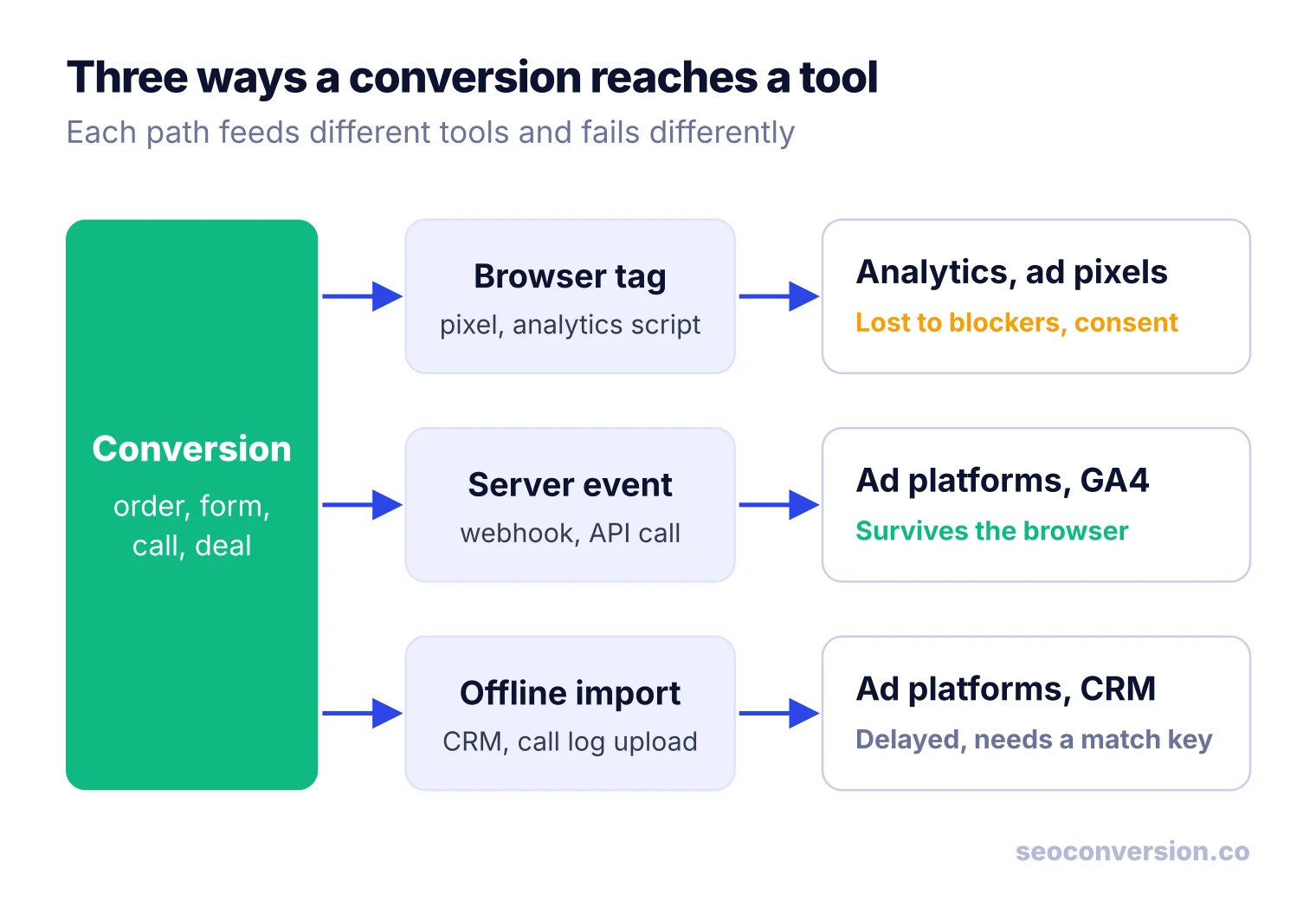
A conversion can reach a tool by three paths, and each one fails in its own way:
- Browser tag. A script on the page fires when the action happens. Cheap and quick to install, but ad blockers, browser tracking protection and declined consent stop part of these events.
- Server event. Your server or store platform sends the event after the order or lead is saved. It does not depend on the browser, but it needs a developer or an app, and deduplication if a browser tag sends the same event.
- Offline import. You upload calls or closed deals from your CRM, matched by a click ID or hashed email. It is the only way to count revenue that happens after the visit, and it arrives days or weeks late.
Name events the same way in every tool (for example generate_lead, purchase, phone_call) and fire them on the success state, not the button click. A click on “Submit” also fires when the form has an error.
Which Conversion Tracking Tools You Need, by Business Type
Start from the conversions you actually get, then add tools only where a gap costs you decisions:
| Business | Main conversions | Core stack | Add when |
|---|---|---|---|
| Lead generation (B2B, services) | Forms, demo requests | Web analytics + CRM with source fields | Ad spend: platform tags and offline import |
| Local business | Calls, direction requests, forms | Web analytics + call tracking | Several locations: per-location numbers |
| Ecommerce | Orders, revenue | Store analytics + web analytics ecommerce events | Ad spend: platform tags with server events |
| SaaS | Trials, signups, upgrades | Web analytics + product analytics | Sales-led deals: CRM revenue import |
| Content and SEO-led sites | Leads or sales from organic pages | Web analytics with conversions by landing page | AI assistant traffic matters: referral-based AI reporting |
How to Choose Conversion Tracking Tools
- Coverage of your conversions. Can it record every action you get money from: orders, forms, calls, bookings, deals? A tool that ignores calls is useless for a plumber.
- Value, not just counts. It should store order revenue or a value per lead so you can rank channels by money. See how to calculate conversion value.
- Capture method. Browser only, server events, or both. The more of your revenue rides on ads, the more server delivery is worth.
- Privacy fit. Cookie use and consent requirements differ by tool and by country. Check what the tool stores before you decide whether it needs a banner where you sell.
- Integrations. Your CMS or store, your CRM, your ad accounts. A native integration beats a custom script you have to maintain.
- Who maintains it. Practitioners on PPC forums still describe tracking beyond a basic thank-you page as a time sink. If no one owns the setup, pick tools that autocapture forms and purchases rather than ones that need a tag per event.
- Pricing model at your volume. Covered below.
Free Conversion Tracking Tools
A small site can track conversions properly without paying anything:
- Google Analytics 4 for on-site conversions and channels.
- Google Tag Manager to deploy and manage tags.
- Google Ads and Meta tags, free with the ad accounts.
- Google Search Console for the clicks and impressions before the visit (it does not record conversions).
- Microsoft Clarity for heatmaps and recordings.
- A free CRM tier to keep lead source and deal value together.
Free tools cost time instead of money: configuration, consent setup, and regular checks that events still fire.
What Conversion Tracking Tools Cost
The tool lists that rank for this topic quote prices, but those change often, so check the vendor’s pricing page on the day you buy. What matters more is how a tool charges, because that decides what happens to your bill as you grow:
- Free with limits: GA4, tag managers, ad platform tags. Paid enterprise tiers exist (Analytics 360) for very large volumes and service levels.
- Per pageview or event: most privacy analytics and product analytics tools. Cost follows traffic.
- Per order or per tracked conversion: many ecommerce tracking apps and some conversion trackers. Cost follows success.
- Per number or per minute: call tracking.
- Per seat or contact: CRMs.
- Flat fee: some store apps and server-side hosts.
Test a Tool Before You Trust It: The Capture-Rate Audit
None of the tool lists tell you how to check whether a tool records what really happened. You can, with a number you already own: your order count or CRM lead count. Compare the conversions each tool recorded, from any source, against that backend count for the same period.
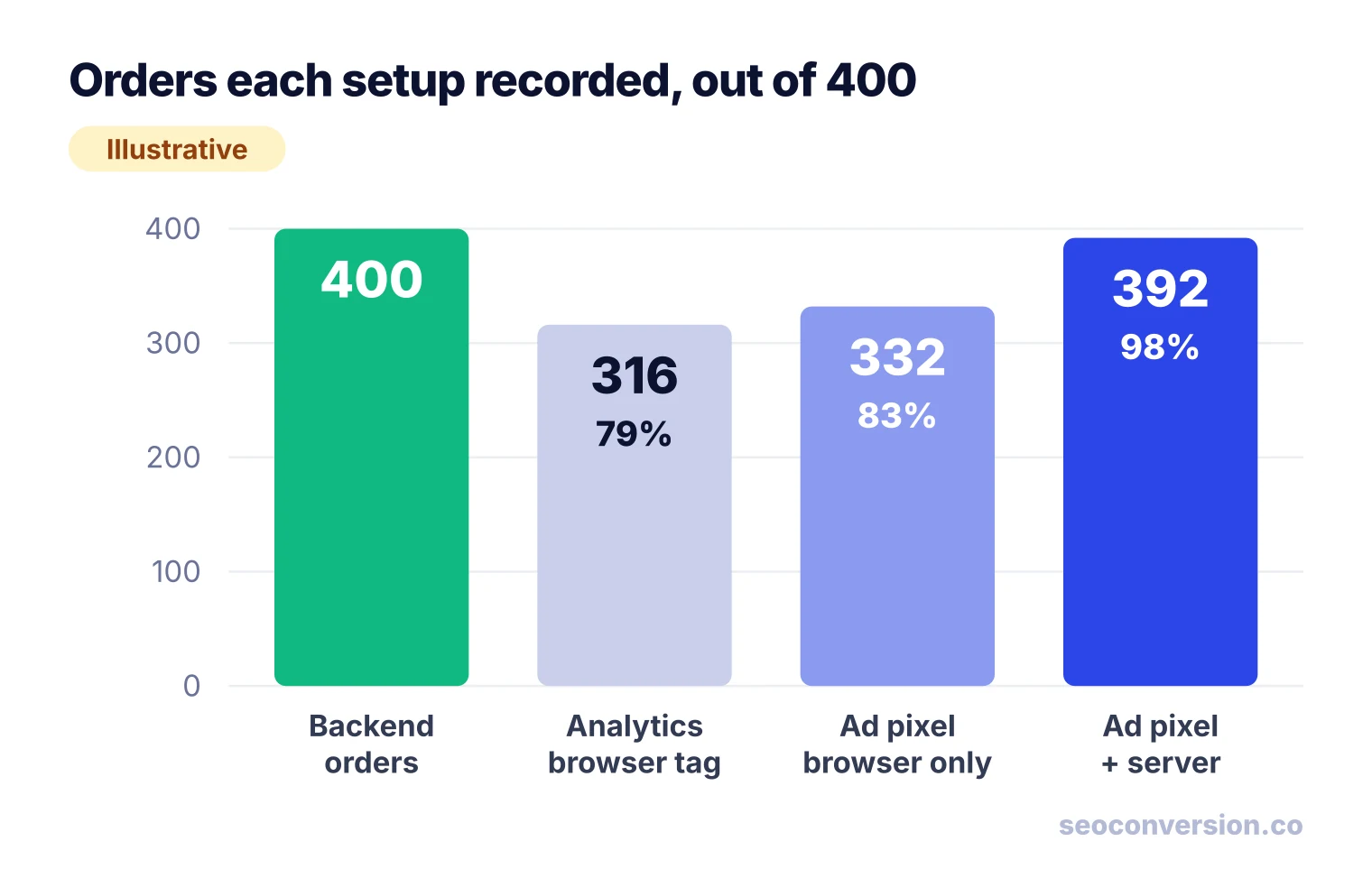
Worked example (illustrative numbers). A store has 400 orders in Shopify over 30 days. Over the same 30 days:
- The analytics browser tag recorded 316 purchase events: 316 / 400 = 79% capture rate.
- The ad platform pixel, browser only, received 332 purchase events: 332 / 400 = 83%.
- After adding server events with deduplication, the same platform received 392: 392 / 400 = 98%.
How to run the audit:
- Pick a closed period of at least two weeks and one conversion type with a clean backend count (orders, or form entries).
- Export the backend count. Remove test orders, cancellations and internal submissions.
- In each tool, count all recorded events of that type, across every channel, in the same time zone.
- Divide. Then place 3 to 5 test conversions yourself, with and without an ad blocker, and check that each tool shows them.
- Repeat after every site redesign, checkout change or new consent banner.
A steady capture rate means trends are usable even if totals are low. A rate that drops suddenly means something broke. A rate above 100% means duplicates: a tag firing twice, or a browser and server event sent without a shared event ID.
Why Your Tools Disagree, and Which One Is the Referee
Recording and crediting are different jobs. Even with perfect capture, each ad platform credits itself for any conversion its ads touched, including some after a view and not a click. Continuing the example: Google Ads claims 180 of the 400 orders, Meta claims 170 and the email tool claims 90. That adds up to 440, which is 110% of real orders. Nobody is lying; they are counting the same buyers.
Use the platforms’ own numbers to manage bids inside each platform. For totals by channel, pick one tool that gives each conversion to one source, usually your web analytics or CRM, and stick with it. The marketing attribution tools guide covers the models those tools use to share credit.
Organic Search and AI Assistants: What Ad Tags Miss
Ad platform tags only report conversions linked to their own ads. Organic search and AI assistants have no tag of their own, so their conversions show up only in your analytics tool, and only if you look at them by landing page. Google Search Console shows clicks per page but no conversions, and search engines do not pass the keyword. The workable unit is the organic landing page: conversions and value per page that a visitor entered from search. The SEO conversion tracking guide sets this up step by step.
Visits from ChatGPT, Perplexity, Gemini and Copilot can be recognized when the assistant sends a referrer or a UTM tag. When it sends neither, the visit lands in Direct and no tool can recover it honestly. See AI conversion tracking for the referrer list and GA4 setup. SEOConversion was built for this gap: a cookieless, first-party script that reports conversions and value from Google, Bing and AI assistants by landing page, and leaves a visit in Direct when no referrer says where it came from.
Turn Tracked Conversions Into Value per Landing Page
Counts mislead when conversions differ in worth. Give each conversion type a value, then rank pages by money. Illustrative values for a B2B service: a demo request is worth $400 (20% close rate × $2,000 average first-year deal), a phone call $150, a newsletter signup $5.
| Organic landing page | Conversions | Calculation | Value |
|---|---|---|---|
| /pricing | 18 demo requests | 18 × $400 | $7,200 |
| /services/audit | 30 calls | 30 × $150 | $4,500 |
| /blog/guide | 4 demos + 120 signups | 4 × $400 + 120 × $5 | $2,200 |
The blog guide has the most conversions (124) and the least value. Ranked by count, it looks like your best page; ranked by value, the pricing page earns more than three times as much. That ranking is what should drive which pages you update first.
Common Mistakes With Conversion Tracking Tools
- Counting button clicks as conversions. Fire on success: the thank-you state or the saved order.
- Too many key events. Marking scrolls and video plays as conversions inflates rates and confuses ad bidding.
- Adding up platform reports. Their claims overlap. Use one referee.
- No values. Without a value per conversion, a newsletter signup and a demo request look equal.
- Browser and server events without deduplication. Capture rates above 100% are the symptom.
- Never re-testing. Site changes break tags silently. Rerun the capture-rate audit after each release that touches forms or checkout.
- Buying CRO tools before tracking works. Tests judged on a broken conversion event pick the wrong winner.
Use Tracking and CRO Tools Together
Once counts are trustworthy, the tools work as one loop:
- Conversion tracking shows which landing pages and steps lose the most value.
- Heatmaps and recordings on those pages show where visitors hesitate or fail.
- A short on-page survey asks visitors what stopped them.
- You write one hypothesis and test it with an A/B testing tool.
- Conversion tracking measures the result in value, not just rate, and the loop starts again.
FAQ
What is the difference between CVR and CTR?
CTR (click-through rate) is clicks divided by impressions: how many people who saw an ad or search result clicked it. CVR (conversion rate) is conversions divided by visits or clicks: how many visitors went on to buy, sign up or call. A conversion tracking tool is what produces the CVR side, since impressions and clicks come from the ad platform or Search Console.
What is the best marketing tracking software?
There is no single best tool, because each one sees a different part of the journey. For most sites the answer is a free web analytics tool for on-site conversions, the ad platform tags for the channels you pay for, and your CRM or order system as the source of truth. Pick by the conversions you have (orders, forms, calls, deals) and test any tool against your backend before you trust it.
What are the 5 marketing tools?
There is no official list of five. For measurement, the five tool types most sites end up with are web analytics, a tag manager, ad platform tags, a CRM or order system, and a behavior tool such as heatmaps or session replay. Lists that answer this question for marketing in general usually add email, SEO and social scheduling tools.
What is the 3-3-3 rule for marketing?
It is not a standard term, and people use it for different informal rules, so ask whoever cited it what they mean. It has no defined meaning in conversion tracking. If you need a rule for tracking, a practical one is: every conversion you count should have a value, a source, and a backend record you can check it against.
Are there free conversion tracking tools?
Yes. Google Analytics 4, Google Tag Manager, Microsoft Clarity and the conversion tags from Google Ads and Meta cost nothing to use. Most privacy-focused analytics tools and CRMs also have free tiers with limits. Free tools are enough for most small sites; you pay later for server-side delivery, call tracking or higher volumes.
Why do my conversion tracking tools show different numbers?
Each tool records a different share of conversions and uses its own credit rules. Browser tags lose events to ad blockers and declined consent, ad platforms count conversions after ad views and over long windows, and every platform claims the sales it touched. Compare each tool with your backend count and pick one tool as the referee for channel totals.
Count the conversions your organic pages and AI assistants bring in.
SEOConversion is a cookieless, first-party tracker that shows conversions and value from Google, Bing, ChatGPT, Perplexity and other assistants for each landing page, from one script.
Start free