
Conversion Tracking Pixel: How It Works, Code Examples and Fixes

A conversion tracking pixel is a small piece of code on your website that tells an ad platform or analytics tool when a visitor completes an action, such as a purchase, a sign-up or a lead form. It started as a 1x1 transparent image whose request carried the conversion data; today it is usually a JavaScript tag like the Meta Pixel or the Google tag. The platform matches that signal to the ad click that brought the visitor, and reports the conversion against the ad.
This guide shows exactly what a pixel sends, with code examples, how to install and test one, the eight ways pixels go wrong, how to run a pixel and a conversions API without double counting, and what pixels never see. It also answers the privacy questions people ask most: whether tracking pixels are legal, why they are controversial, and how to spot one in an email. For conversion tracking in general, start with what conversion tracking is and how it works.
What Is a Conversion Tracking Pixel?
The name comes from the original technique. An advertiser placed an invisible image, one pixel wide and one pixel high, on the confirmation page. When the page loaded, the browser requested that image from the ad network’s server, and the request itself was the conversion report. The image was never the point; the request was.
Modern pixels are mostly JavaScript, but the name stuck. You will see the same thing called a pixel, a tag, a conversion tag, a beacon or an insight tag, depending on the platform:
- Meta Pixel for Facebook and Instagram ads, which sends events like
Purchase,LeadandCompleteRegistration. - Google tag plus a conversion event snippet for Google Ads.
- TikTok Pixel, LinkedIn Insight Tag and the X Pixel for their ad platforms.
- Email open pixels from email tools, which report that a message was opened rather than a sale.
A pixel is different from a cookie. The cookie stores an ID in the browser; the pixel is what sends the event, usually along with that cookie ID and any click ID from the ad URL, so the platform can tie the conversion to a person and an ad.
How a Conversion Tracking Pixel Works
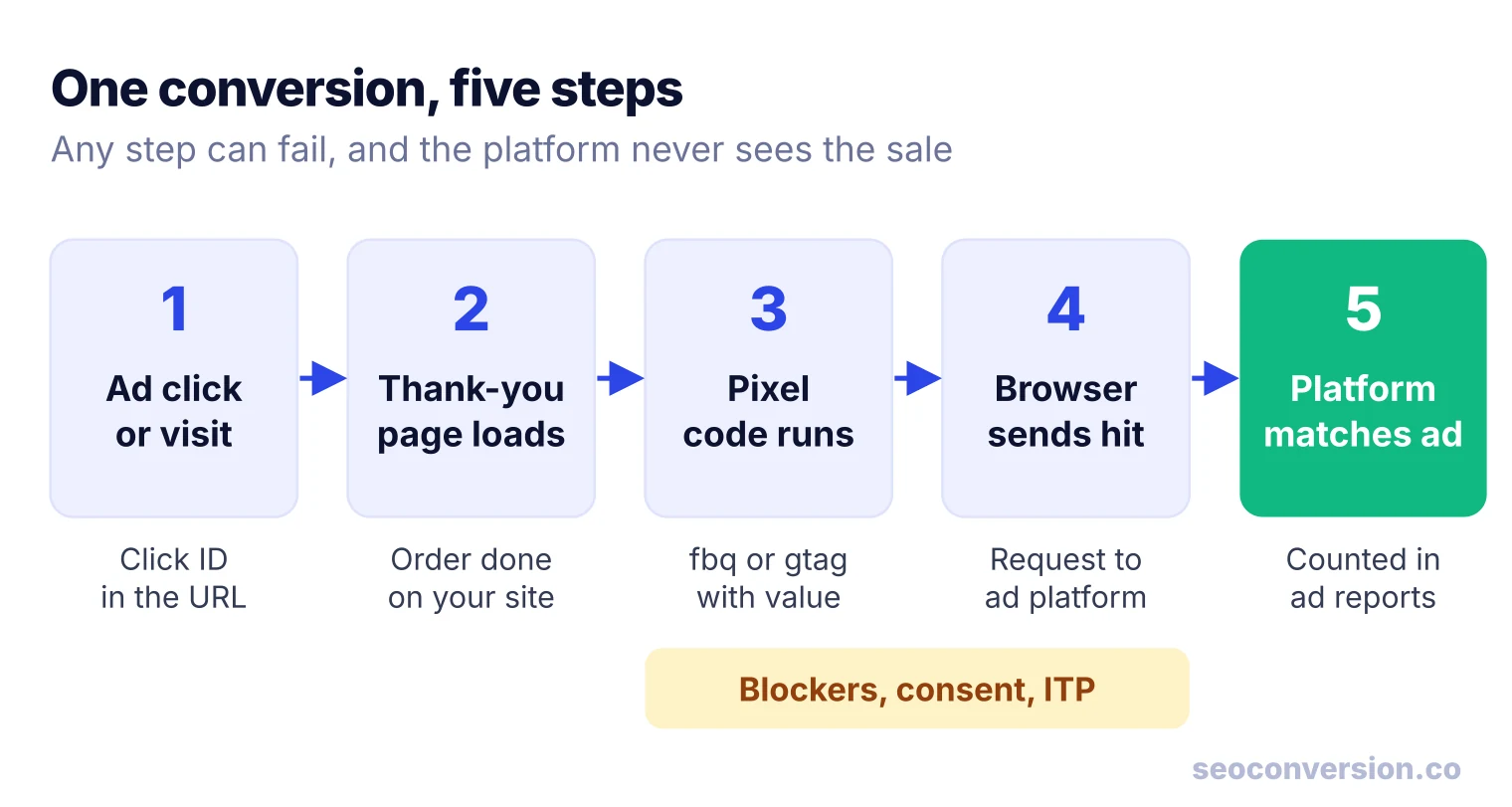
Every pixel conversion goes through the same chain. If one link breaks, the platform never hears about the sale.
- The visitor arrives. An ad click adds a click ID to the landing URL (
gclidfor Google Ads,fbclidfor Meta). The pixel’s base code, loaded on every page, stores it in a cookie. - The conversion happens on your site. The order is placed, the form is submitted, the confirmation page loads.
- The pixel code runs. A call such as
fbq('track', 'Purchase')orgtag('event', 'conversion')fires with the event name, value and currency. - The browser sends a request to the platform’s servers with the event, the page URL, the cookie ID and the click ID.
- The platform matches it to a click or view of one of its ads within its attribution window, then counts the conversion in your ad reports and feeds it to bidding.
Here is the old image technique in its simplest form, the way an affiliate network or your own server could do it. The data you need rides in the query string, and your server logs every request:
<img src="https://tracker.example.com/px.gif?event=purchase&order_id=10432&value=89.00¤cy=USD"
width="1" height="1" alt="" style="display:none">Nothing requires an image. A script request or a fetch call does the same job, and that is what JavaScript pixels use. Ad platforms still ship an image version as a fallback: the Meta Pixel’s base code includes a <noscript> image that requests facebook.com/tr with the pixel ID and event when JavaScript is off.
What the platform does with the hit shows up as metrics in your ad account. In Meta Ads Manager, for example, a column like website registrations conversion value is simply the total of the value parameters the pixel sent with registration events that Meta matched to your ads.
Types of Tracking Pixels
The same code does several jobs. What differs is which event it sends and what the platform does with it.
| Type | What it records | Typical use |
|---|---|---|
| Conversion pixel | A completed goal: purchase, lead, sign-up, booking | Report conversions per ad, feed automated bidding |
| Event pixel | Smaller actions: add to cart, video view, button click | Funnel reports, optimizing for earlier steps |
| Retargeting pixel | Page views and product views | Build audiences to show ads to past visitors |
| Email open pixel | An image loaded when the email is displayed | Open rates in email tools |
In practice one Meta Pixel or one Google tag does all three website jobs: the base code records page views for retargeting, and the event calls record conversions.
Image Pixel vs JavaScript Pixel vs Server Event
You have three ways to report the same conversion. Most ad platforms now support all of them, and the right answer is often two at once.
| Image pixel | JavaScript pixel | Server event (conversions API) | |
|---|---|---|---|
| Where it runs | Browser, as an image request | Browser, as a script | Your server, calling the platform’s API |
| Setup effort | Paste one tag | Paste base code, add event calls | Developer work or a platform integration |
| Data it can send | Only what fits in the URL | Events, values, cookie and click IDs, page data | Anything your server knows, including offline and late conversions |
| Blocked by ad blockers | Often | Often | No, the browser is not involved |
| Affected by consent choices | Yes | Yes | Yes: consent rules still apply to what you send |
| Best for | Fallback, email opens, simple affiliate tracking | Most websites, quick start | Purchases and leads you cannot afford to miss |
This also answers a common forum question, such as how to track X (Twitter) or TikTok conversions without the pixel: send the conversion from your server through the platform’s conversions API instead, or alongside it. If you route browser tags through your own server, see server-side GTM.
Conversion Tracking Pixel Examples (Code)
Meta Pixel
Meta’s base code goes in the <head> of every page. It loads the library, initializes your pixel ID and records a page view. The conversion is a separate call on the page or in the handler where the action succeeds. The syntax below follows Meta’s conversion tracking documentation:
<!-- In the base code, on every page -->
fbq('init', 'YOUR_PIXEL_ID');
fbq('track', 'PageView');

<!-- On the order confirmation page: a standard event -->
fbq('track', 'Purchase', {value: 89.00, currency: 'USD'});

<!-- A custom event, for actions with no standard name -->
fbq('trackCustom', 'QuoteRequested', {plan: 'annual'});
Meta lists currency and value as required for Purchase. Standard events such as Lead, CompleteRegistration, Schedule and Subscribe work the same way. Without code, you can also create a custom conversion in Events Manager from a URL rule, such as any page whose URL contains /thank-you.
Google Ads
Google Ads uses the Google tag on every page plus an event snippet on the conversion page. The snippet Google Ads generates looks like this, with your own conversion ID and label:
gtag('event', 'conversion', {
  'send_to': 'AW-CONVERSION_ID/CONVERSION_LABEL',
  'value': 89.0,
  'currency': 'USD',
  'transaction_id': '10432'
});
Google’s help center says the transaction_id is there to minimize duplicate conversions. Fill it with the real order ID from your platform; a fixed value or an empty string gives you nothing.
How to Install a Conversion Tracking Pixel in 5 Steps
Step 1: Install the base code on every page
Use the simplest route your site supports. Shopify, WordPress, Wix and most booking or membership tools have a field for a Meta pixel ID or a Google tag, which also fires the standard e-commerce events for you. Otherwise add the base code through Google Tag Manager or paste it into the theme’s <head>. Pick one route only: a pixel installed by both a plugin and the theme fires twice.
Step 2: Fire the conversion event on success
Fire the event when the action has actually happened: on the confirmation page, or in the form’s success callback. A click handler on the submit button counts failed validations and abandoned payments as conversions.
If you sell several products or tiers, such as a free membership, a monthly plan and a yearly plan, you do not need a different pixel for each. Either use a separate confirmation URL per tier and build a URL-based custom conversion for each, or fire one event with the tier name and the real value as parameters. The second option is easier to maintain, and the value lets the platform optimize for revenue rather than sign-up count.
Step 3: Send value, currency and a unique ID
A conversion without a value is a count, not money. Pass the order total for sales. For leads, use an average lead value; our guide to calculating conversion value shows the math. Always pass the order or lead ID as well, for deduplication.
Step 4: Test with the platform’s debugger
Complete a real test conversion, not just a page view. For Meta, the Meta Pixel Helper browser extension shows each event the page fires and warns when the pixel activates more than once; the Test events tab in Events Manager shows what Meta received. For Google Ads, Google Tag Assistant shows whether the conversion event fired on the confirmation page with the right ID, label and value, and the conversion action’s status in the Google Ads conversions summary shows whether Google has recorded the tag recently.
Step 5: Reconcile with your own records
After a week, compare what the platform reports with your store or CRM. The numbers will not match, because the platform only counts conversions it can tie to its ads and uses its own attribution window. But a pixel reporting more purchases than you had orders, or zero purchases on a day you sold, means it is broken.
Why Your Conversion Pixel Is Wrong: 8 Failure Modes
Most broken pixel setups fall into one of these. Check them in order: the first three cause most inflated numbers.
| Symptom | Likely cause | Fix |
|---|---|---|
| Every event counted twice | Base code installed twice (theme plus plugin, or plugin plus tag manager) | Keep one install; Pixel Helper flags a pixel that activated more than once |
| More purchases than orders | Confirmation page reloaded, revisited or bookmarked | Send the order ID (transaction_id, eventID) and fire once per order |
| Leads counted that never arrived | Event fires on button click, before validation | Fire on the success state or confirmation page |
| Conversions with no revenue | Value or currency missing, or hard-coded | Pass the real total and a currency code dynamically |
| Zero conversions from a booking or checkout widget | Confirmation happens inside an iframe or on another domain the pixel is not on | Use the vendor’s built-in pixel setting, or add the pixel on that domain |
| URL-based conversion never triggers on a single-page app | The URL changes without a page load | Fire the event in code when the success view renders |
| Conversions drop after a cookie banner goes live | Pixel waits for consent and many visitors decline | Expected; send server events for consented users and use the platform’s consent features |
| Ad platform reports far fewer sales than the store | Ad blockers, Safari’s tracking limits, slow pages closing early | Add a server-side conversions API with deduplication |
On the last row: Safari caps the lifetime of cookies that scripts set, which shortens how long a pixel can connect a later sale to an ad. Our guide to Safari ITP covers what it changes. For consent, see Consent Mode v2.
Running a Pixel and a Conversions API Without Double Counting
When you send the same purchase from the browser pixel and from your server, the platform receives it twice. It counts it once only if it can tell the two are the same event. Meta’s rule, from its deduplication documentation, is that the pixel’s eventID must match the server event’s event_id, and the event names must match. Events are only deduplicated within 48 hours of the first one with that ID.
// Browser: the event ID is the fourth argument
fbq('track', 'Purchase', {value: 89.00, currency: 'USD'}, {eventID: 'order-10432'});

// Server (Conversions API payload, simplified)
{ "event_name": "Purchase", "event_id": "order-10432", ... }Use the order or lead ID as the event ID, generated once and passed to both the page and the server. A random ID created separately in each place never matches, and every conversion gets counted twice. For Google Ads, the same job is done by sending the order ID as transaction_id.
Worked Example: What the Pixels Claim vs What You Sold
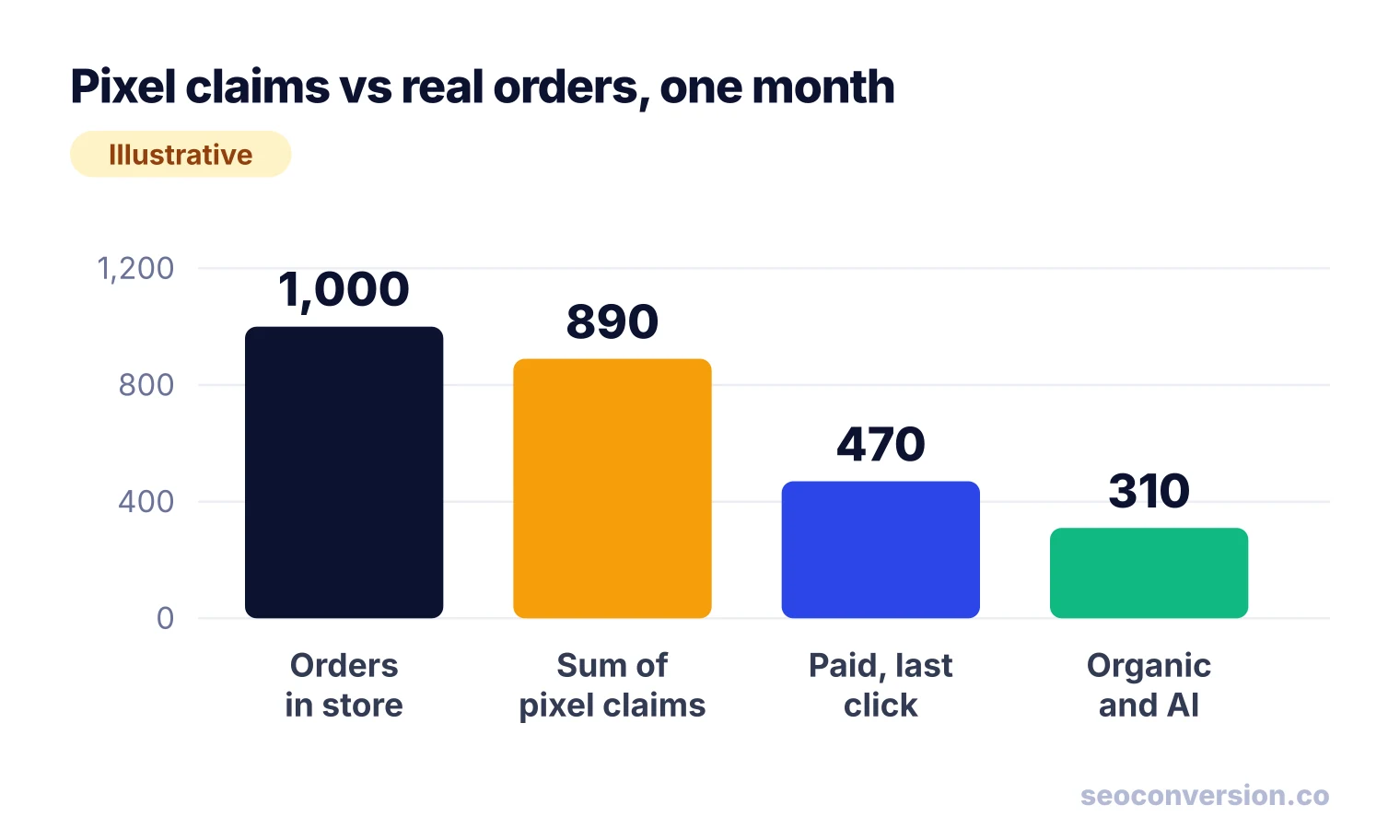
Pixels answer “how many conversions does this platform take credit for?”, not “where did my sales come from?”. Adding their numbers together is the most common way stores fool themselves. Here is one month for a store, with illustrative numbers.
| Source | Conversions | What it measures |
|---|---|---|
| Store orders (Shopify) | 1,000 | Every real order |
| Meta Pixel, Purchase | 420 | Orders Meta matched to a click or view of its ads |
| Google Ads tag | 380 | Orders Google matched to a click on its ads |
| TikTok Pixel | 90 | Orders TikTok matched to its ads |
| Sum of pixel claims | 890 | 89% of all orders |
| Analytics, last click: paid ads | 470 | 260 Google Ads, 210 paid social |
| Analytics, last click: organic search and AI assistants | 310 | 290 organic search, 20 AI assistants |
| Analytics, last click: email and direct | 220 | 110 email, 110 direct |
The pixels claim 890 orders, but only 470 orders had a paid ad as the last click. The other 420 claims are view-through conversions, orders two platforms both claim, and orders where an ad came earlier in the journey. None of that is wrong by each platform’s rules. It just cannot be added up.
Put money on it. With an illustrative $80 average order and $15,000 of monthly ad spend:
The truth for paid sits somewhere between those two figures, and only a holdout test settles it. Meanwhile the 310 orders from organic search and AI assistants, $24,800 at the same order value, appear in no pixel report at all. If you judge channels by pixel dashboards, that money is invisible.
What Ad Pixels Never See: Organic Search and AI Assistants
An ad pixel is built to credit its own ads. A visitor who finds you through a Google organic result, a Bing result or a ChatGPT answer and then buys is, at best, a conversion the pixel records without credit to any ad, and at worst one it credits to a retargeting ad they saw later. No ad pixel will tell you which blog post or product page brought in the sale from search.
To measure those channels, record the conversion on your own site along with the source of the visit, then report conversions and value by landing page, since search engines do not pass the keyword. The method is in our SEO conversion tracking guide and, for ChatGPT, Perplexity and other assistants, in AI conversion tracking. SEOConversion does this with one first-party, cookieless script: it captures form submits, calls and e-commerce events and attributes their value to organic search and AI assistants by landing page, and when an assistant sends no referrer it leaves the visit as Direct rather than guessing.
Are Tracking Pixels Legal?
Tracking pixels are not illegal in themselves. Whether a given pixel is lawful depends on what data it sends, to whom, and whether your notice and consent match the laws that apply to your visitors. The trouble starts when a pixel quietly sends sensitive information, such as health details, the contents of a form or what someone searched for, to an ad platform.
The US Federal Trade Commission’s technology office spelled out the risk in a 2023 explainer on pixel tracking: pixels are invisible to users, can send almost any data on the page, and hashing that data does not reliably anonymize it. The same piece points to its actions against GoodRx and BetterHelp, which shared users’ health information with advertisers through tracking pixels and were banned from sharing health data for advertising. LinkedIn’s own help center tells advertisers not to place its Insight Tag on pages that contain sensitive health or financial data.
Why tracking pixels are controversial
- They are invisible. A visitor has no way to see that a page reports their actions to several ad companies.
- They send more than you think. A pixel sends the page URL with every event, and on some sites the URL alone reveals a medical condition, a search or a financial situation.
- Blocking cookies does not stop them. The FTC notes that cookie controls alone do not prevent pixel tracking.
Practical rules: keep ad pixels off pages that handle sensitive data, such as patient portals and account areas; send only the event, value and IDs you need; and follow the notice and consent requirements for your audience. Our guide to cookie banner requirements covers when you need one. This is general information, not legal advice.
Email Tracking Pixels: How to Tell if an Email Has One
Email tools put a tiny, uniquely named image in each message. When your email app loads images, it requests that image, and the sender records an open, plus the time and often your IP address. Email marketing tools commonly add one to measure opens.
You usually cannot see the pixel, but you can tell it is there and stop it. Turn off automatic loading of remote images in your email app: if a message shows a “load images” prompt, it contains remote images, and any of them can be a tracker. On iPhone, iPad and Mac, Apple’s Mail Privacy Protection hides your IP address and prevents senders from seeing whether you opened their message. For senders, that is why open rates from Apple Mail users are unreliable, and why conversions on the site, not opens, are the number to report.
FAQ
What is the difference between a tracking pixel and a cookie?
A cookie is a small text file stored in the browser that remembers an ID. A tracking pixel is the code or image request that sends an event to a server. Most ad pixels use both: the pixel reads a cookie, such as an ID set on the first visit, and sends it along with the conversion so the platform can match it to an ad click.
Do I need a separate conversion pixel for every ad platform?
Yes. Meta, Google Ads, TikTok, LinkedIn and X each count conversions only from their own tag, because each one matches the conversion to its own ad clicks. A tag manager or your store’s built-in integrations let you manage them in one place, but each platform still needs its own pixel or conversions API connection.
Are tracking pixels still used?
Yes. Every major ad platform still issues a pixel or tag, and email tools still use open pixels. What changed is that browser limits, ad blockers and consent rules make them miss conversions, so platforms now pair the pixel with a server-side conversions API and deduplicate the two.
How do I check that Google conversion tracking works?
Open your site in Google Tag Assistant, complete a test conversion and confirm the conversion event fires on the confirmation page with the right conversion ID, label and value. Then check the status of the conversion action in the Conversions summary in Google Ads, which shows whether Google has recently recorded the tag.
Can a conversion pixel track conversions from organic search?
An ad pixel reports conversions to its own ad platform and credits them to that platform’s ads, so it does not report organic search or AI assistant conversions. To see those, you need analytics that records the source of the visit and the conversion on your own site, then reports conversions by landing page and channel.
Should I use a pixel or a conversions API?
Use both if the platform supports it. The pixel is easy to install and captures browser events like page views and clicks, while a server-side conversions API still reports conversions when the browser blocks the pixel. Send the same event ID from both so the platform counts each conversion once.
See the conversions your ad pixels never credit.
SEOConversion is a first-party, cookieless tracker that shows the conversions and revenue coming from organic search and AI assistants, by landing page, with one script.
Start free