
Carrd Analytics: Native Views, GA4 Setup and Form Tracking

Carrd analytics works in three ways: Carrd’s own cookie-free view counter, a supported provider such as Google Analytics, Plausible or Fathom picked from the site’s Analytics panel, or any other tool pasted in with an Embed. All three need a Pro Standard plan or higher. The native tool only counts views, so use a provider if you want traffic sources, and add form events if you want to know which source brings signups.
Several pages that rank for this search still say Carrd has no built-in analytics. That changed on October 2, 2026, when Carrd’s changelog announced Carrd Analytics. This guide covers what each option measures, which plan unlocks what, how to set them up, how to track buttons and forms on a one-page site, and how to turn the numbers into a value per visit by source.
Your Carrd Analytics Options at a Glance
| Option | How you add it | What it measures | Plan needed |
|---|---|---|---|
| Carrd Analytics (native, beta) | Analytics panel, choose Carrd Analytics | Views over 24 hours, 7 or 30 days | Pro Standard |
| Built-in providers: Google Analytics, Plausible, Fathom, Matomo, Umami, Simple Analytics, Cloudflare Web Analytics, PostHog Web Analytics | Analytics panel, choose the provider and paste its ID | Whatever the tool reports: visitors, sources, pages, devices, goals | Pro Standard |
| Any other script (Muro, Clarity, a custom tool) | Embed element, Style Hidden, placed in Head | Whatever the tool reports | Pro Standard |
| Marketing trackers (Meta, LinkedIn, TikTok) | Analytics panel, Marketing Trackers | Ad conversions and audiences on those platforms | Pro Standard |
| Button and form events | Element Settings, Events (On Click, On Success) | Clicks and successful form submissions sent to your provider | Pro Plus |
Which Carrd Plan You Need for Analytics
Plan limits decide what you can measure, so check them before you pick a tool. On Carrd’s plans page (checked October 2026), Analytics, Embeds, Forms and Widgets first appear on Pro Standard. The developer features that make click and form tracking easy sit on Pro Plus.
| Plan (yearly price) | Site Analytics panel | Embeds (custom scripts) | Forms with UTM collection | Fixed element IDs and events |
|---|---|---|---|---|
| Free | No | No | No | No |
| Pro Lite ($9) | No | No | No | No |
| Pro Standard ($19) | Yes | Yes | Yes | No |
| Pro Plus ($49) | Yes | Yes | Yes | Yes |
Pro Standard and Pro Plus also come in larger tiers with more sites at higher prices. Prices change, so confirm them on Carrd before you upgrade.
What Carrd Analytics (the Native Tool) Measures
According to Carrd’s documentation for Carrd Analytics, the native service reports one metric: views. A view is a single load of the site by a visitor, with presumed duplicates within a short period filtered out. You choose the last 24 hours, the last 7 days or the last 30 days (the default), and a graph shows the trend, with the count for each point on hover.
- No sources, pages or conversions. Carrd itself recommends switching to another provider if you need traffic source or conversion tracking.
- Not unique visitors. Carrd calls views a general measure of traffic, not a precise count of visitors or sessions. Do not compare it one to one with another tool’s “visitors”.
- Thirty days of reporting. The longest period in the dropdown is 30 days. Write down monthly totals if you want a baseline you can compare next quarter.
- Turning it off deletes the counts. Carrd deletes the aggregate view counts when you disable Carrd Analytics on a site.
- Beta. Carrd lists it as beta and asks users to report issues. New views can take a few minutes to appear, and a “No data yet” message shows until enough views are tracked.
- No AI layer. It is a counter and a graph. There are no generated insights or summaries.
The upside is privacy. Carrd says the service uses no cookies, no client-side browser storage and no external scripts. It processes a small amount of visitor data to filter duplicate views, deletes it after a short period and keeps only aggregate counts.
How to Turn On Carrd Analytics or a Provider
Every option in the Site Analytics panel is enabled the same way. This is also where you go back later to see the numbers, so there is no separate “Carrd analytics login”: you log in to Carrd, or to the provider for third-party tools.
- Open the site’s Analytics settings. In the Dashboard, click the Sites tab, click the Manage icon on the site, then click Analytics in the sidebar.
- Select a provider. Under Site Analytics, click Select Provider and pick Carrd Analytics, Google Analytics, Plausible, Fathom, Matomo, Umami, Simple Analytics, Cloudflare Web Analytics or PostHog Web Analytics.
- Enter the provider’s ID and enable. For a third-party tool, create the site in that tool first and paste the ID it gives you (for GA4, the Measurement ID that starts with G-). Click Enable.
- Check that data arrives. Open the published site in a new tab, then look for the visit in the provider’s realtime view, or in the Analytics tab for Carrd Analytics. Clicking Manage next to a third-party provider links you to its dashboard.
If you enable Google Analytics in the panel, do not also paste a Google tag in an Embed. Two copies of the same tag count every pageview twice. Older tutorials tell you to use an Embed for tools that now have a built-in option, so check the panel first.
Add any other tool with an Embed
For a tool that is not in the provider list, use Carrd’s Embed element:
- In the editor, add an element and choose Embed.
- Set Type to Code and paste the tool’s script tag.
- Set Style to Hidden and choose Head (Body Top and Body End also exist; use the placement the vendor asks for). Hidden embeds do not take space on the page, so you can move the element to the end of the site.
- Give it a Label such as “Analytics” so you can find it later, click Done and publish.
The embed outputs nothing in the builder, so you only see it working on the published site. If you are choosing between script-based tools, our lightweight analytics comparison measures what each one adds to page weight, which matters on a fast one-pager.
Marketing trackers (ad pixels)
The same Analytics page has a Marketing Trackers section where you switch on platform pixels such as the Meta Pixel, LinkedIn Insight Tag and TikTok Pixel. They measure ad conversions and build audiences on those platforms; they are not a replacement for site analytics. Carrd warns that they collect additional visitor data and asks you to read each platform’s privacy policy before enabling one.
Carrd Analytics vs GA4 vs Privacy-First Tools
| Carrd Analytics | Google Analytics 4 | Privacy-first tools (Plausible, Fathom, Simple Analytics, Umami) | |
|---|---|---|---|
| Cost | Included in Pro Standard | Free | Usually a paid subscription; Umami and Matomo can be self-hosted |
| Metrics | Views only | Users, sessions, sources, pages, events, key events | Visitors, sources, pages, countries, devices, goals |
| History | Last 30 days | Months of reports | Depends on the tool and plan |
| Cookies | None, no external script | First-party cookies | Most run without cookies |
| Conversions | No | Key events with values | Goals and custom events |
| Ad platforms | No | Google Ads links | Usually no |
| Learning curve | None | Steep for a one-page site | Low, one dashboard |
For a portfolio or a link-in-bio page, Carrd Analytics answers the only question many owners have: is anyone visiting? Once you share the page in several places, you need sources, and that means a provider. GA4 is free and connects to Google Ads; a privacy-first tool is simpler to read and usually avoids cookies. For a deeper look at the cookie trade-offs, see our guide to cookieless tracking.
What to Measure on a Carrd Site
A one-page site has one job. Measure the job and the few things that explain it, not everything a tool can collect:
- Visits by source: which link, platform or search engine sent people. Tag links you share with UTM parameters (utm_source, utm_medium, utm_campaign) so they show up by name.
- The primary conversion: a successful signup, contact form or purchase, counted on success, not on the button click.
- Main button clicks: one event per call to action that leaves the page, such as a Gumroad, Calendly or Stripe link.
- Section views if your site uses sections as pages (see below).
Scroll depth and time on page rarely change a decision on a short page. Skip them until the basics are in place.
Track Button Clicks and Form Submissions on Carrd
This is where Carrd’s plans matter most. Per Carrd’s Advanced Settings documentation, Pro Plus lets you assign fixed IDs to elements and run custom JavaScript on element events: On Click for buttons, links and icons, On Open and On Close for sections, and On Submit, On Success and On Failure for forms. Carrd’s own example is a Google Analytics gtag() call to track a form submission.
On Pro Plus: fire an event when the form succeeds
Select the form, open Settings, then Events, and paste this into On Success. It assumes GA4 is enabled in the Analytics panel, which loads gtag on the page:
if (typeof gtag === 'function') {
  gtag('event', 'generate_lead', {
    form_id: 'waitlist',
    value: 24,
    currency: 'USD'
  });
}- Use On Success, not On Submit. On Submit fires before Carrd knows whether the submission worked, so failed or blocked submissions would count as leads.
- Publish and submit a test entry on the live site, then look for generate_lead in GA4 Realtime or DebugView.
- Mark generate_lead as a key event in GA4 once it has appeared. Our guide to conversion events walks through that step.
- Do the same for key buttons with On Click, for example
gtag('event', 'cta_click', { button: 'hero_buy' }).
With Plausible, Fathom or Umami, call that tool’s own event function in the same On Success box instead of gtag, then create the matching goal in the tool. The value of 24 is the illustrative lead value from the worked example below; use your own.
On Pro Standard: thank-you URLs, default IDs and UTM collection
- Send the form to a thank-you URL. A form’s On Success setting can show a message or open a URL. A thank-you page counted as a pageview goal in your tool works without any code.
- Use Carrd’s default element IDs with care. Carrd numbers buttons and links in the order you add them (buttons01, links01, and so on), and a script in an Embed can listen for clicks on those IDs. Check the ID with your browser’s inspector, and re-check it after you add or reorder elements, because the number can change.
- Turn on “Collect UTM parameters” on contact and signup forms. Carrd then adds utm_source, utm_medium, utm_campaign, utm_term and utm_content to each submission: appended to the message for contact forms, or written to fields in tools such as Mailchimp, Kit, Brevo or HubSpot for signup forms. Every lead carries its source into your inbox or email list, even if the analytics tool is blocked.
UTM collection is the most underused tracking feature on Carrd. It is the only one of these methods that survives ad blockers and declined cookies, because the source travels with the lead itself. It only works for visitors who arrive on a tagged link, so tag everything you share.
Carrd Sections and Hash URLs
Many Carrd sites use sections to fake several pages on one page. Opening a section changes the address to something like yoursite.com/#about. Tools that only record the initial page load see one page for the whole visit.
- Plausible documents a
hashBasedRoutingoption for Carrd so each section is reported as its own page. - Other tools vary. Open a few sections on the live site and watch the tool’s realtime view to see whether they appear.
- On Pro Plus, a section break’s On Open event can send a named event when the section opens, which works with any tool.
Which Carrd Analytics Setup to Choose
Start from the plan you are on, then from the question you need answered. Each step down the tree adds one kind of answer.
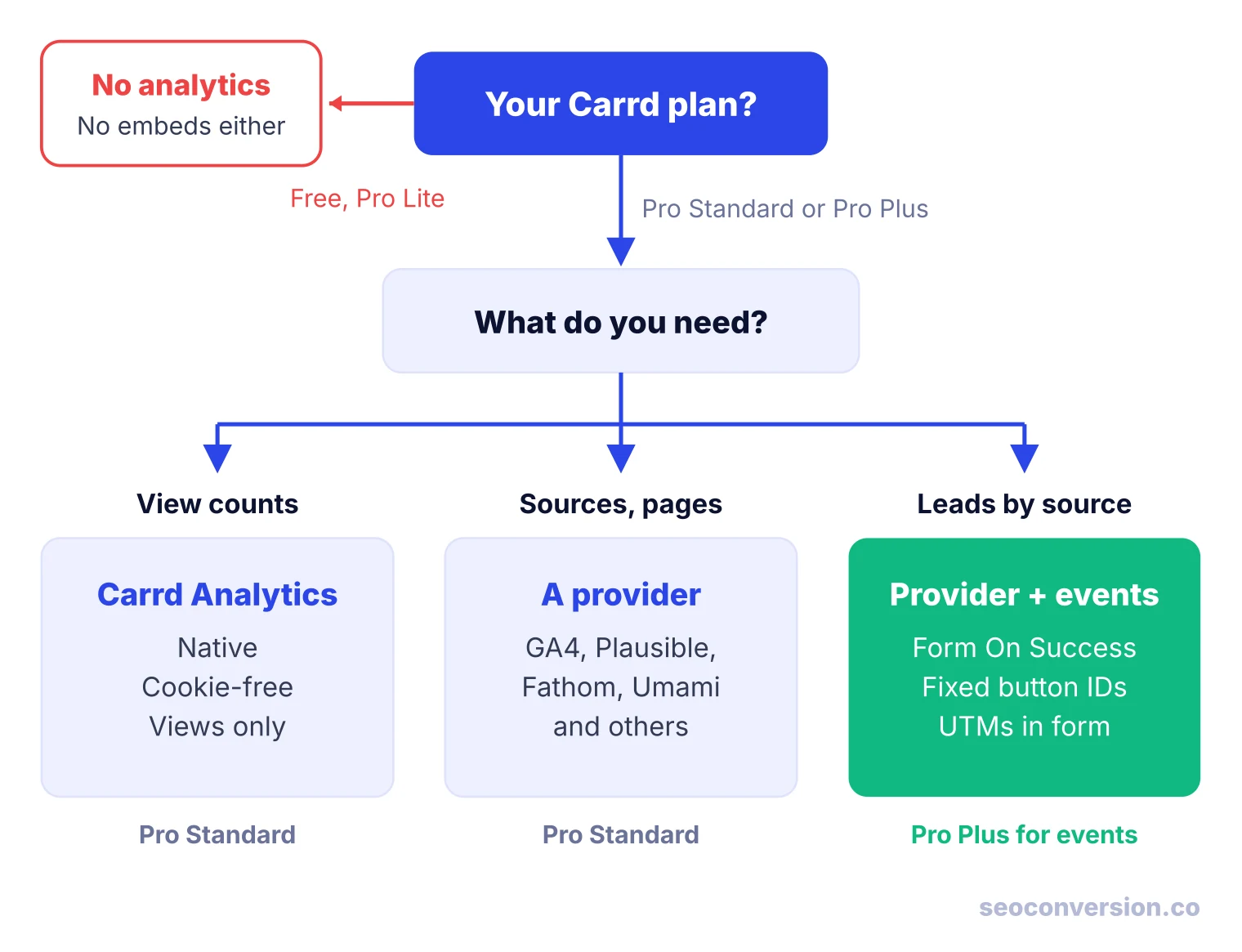
| If you are... | Use |
|---|---|
| On the free plan or Pro Lite | Upgrade to Pro Standard; no analytics or embeds are available below it |
| Checking whether a portfolio or bio page gets visits | Carrd Analytics |
| Sharing the page in several places | A provider from the panel, plus UTM-tagged links |
| Collecting signups or leads on Pro Standard | A provider, a thank-you URL as the goal, and Collect UTM parameters on the form |
| Measured on leads or sales | Pro Plus, a provider, and On Success events with a value |
| Running Meta, LinkedIn or TikTok ads | The matching marketing tracker, alongside site analytics |
Worked Example: Value per Visit by Source
Counting views tells you whether a page is seen. To know which channel deserves your time, you need conversions by source and a value per conversion. An illustrative waitlist page for a small software product, one month of data:
| Source | Visits | Signups | Conv. rate | Value | Value per visit |
|---|---|---|---|---|---|
| Product Hunt | 1,800 | 54 | 3.0% | $1,296 | $0.72 |
| X bio link | 900 | 18 | 2.0% | $432 | $0.48 |
| Organic search (Google) | 600 | 30 | 5.0% | $720 | $1.20 |
| ChatGPT referrals | 100 | 6 | 6.0% | $144 | $1.44 |
| Total | 3,400 | 108 | 3.2% | $2,592 | $0.76 |
The arithmetic: value is signups × $24 (54 × $24 = $1,296), and value per visit is value ÷ visits ($1,296 ÷ 1,800 = $0.72). Carrd Analytics alone would show about 3,400 views and nothing else. With sources and signups, Product Hunt is the biggest channel by volume, but a visit from search is worth $1.20, two and a half times a visit from the X bio link. The ChatGPT row has only 6 signups, so watch it for a few months before you act on it.
To set the value per conversion from your own close rate and deal size, use our guide on how to calculate conversion value. If search is one of your channels, the SEO conversion tracking guide covers how to report it by landing page, and the AI conversion tracking guide explains why some ChatGPT visits arrive with no referrer and land in Direct.
SEOConversion is one script, so on Carrd it goes in a hidden Head embed like any other tool. It captures form submits and high-intent clicks without code, lets you put a value on each conversion, and reports conversions and value from Google, Bing and AI assistants by landing page, without cookies.
Troubleshooting Carrd Analytics
| Problem | Likely cause | Fix |
|---|---|---|
| No data at all | Testing in the builder or preview, or the site was not republished | Publish, then visit the live URL in a new tab |
| Carrd Analytics shows "No data yet" | Not enough views tracked yet | Wait; Carrd shows the message until enough views arrive |
| Pageviews roughly double | Same tool in the panel and in an Embed | Keep one install, remove the other |
| Only one page in reports | Sections change the hash, the tool ignores it | Enable hash tracking (Plausible) or send On Open events |
| Click event stopped firing | Default element ID changed after editing | Re-inspect the ID, or set a fixed ID on Pro Plus |
| Form leads in inbox but not in analytics | Event on the button click, or ad blockers | Fire on On Success; compare with UTM fields on the leads |
| Tools disagree on totals | Views vs visitors, cookies, blockers | Compare like with like; pick one tool as the reference |
| Tracking issues on a carrd.co address | Shared subdomain | Publish to a custom domain (Pro Standard) |
Privacy and Cookie Banners on Carrd
Carrd Analytics sets no cookies and loads no external script, which makes it the lowest-risk option. Third-party providers differ: GA4 uses cookies, while most privacy-first tools run without them, and marketing trackers collect extra data by design. Whether you need a consent banner depends on where your visitors are and which tools you load, not on Carrd itself. Treat any vendor’s compliance claim as their claim and check it against your own situation. If you want sources and conversions without cookies, the cookieless tracking guide covers what is and is not possible, and if you also run sites on other builders, see Framer analytics and Webflow analytics.
FAQ
Does Carrd have built-in analytics?
Yes, since October 2, 2026. Carrd Analytics is a native, cookie-free option in the Site Analytics panel, available on Pro Standard and higher, and it is still labeled beta. It counts views only, over the last 24 hours, 7 days or 30 days, so for traffic sources or conversions you need one of the third-party providers.
How can I see how many people viewed my Carrd site?
On Pro Standard or higher, open the Dashboard, click Manage on the site, go to Analytics and enable Carrd Analytics as the provider. View counts then appear in the same Analytics tab after a few minutes. Carrd says a view is a single load of the site, so treat it as a general traffic measure, not a count of unique people.
Can I add Google Analytics to a free Carrd site?
No. Site Analytics, Embeds and Widgets all require Pro Standard ($19 per year at the time of writing), and the free plan and Pro Lite include none of them. Google Analytics itself is free, so the only cost is the Carrd plan.
Is Carrd better than Wix for analytics?
They suit different sites. Carrd builds one-page sites, and its native tool counts views only, so most owners add a provider such as GA4 or Plausible. Wix is a multi-page builder with its own analytics dashboard. For a link-in-bio or a single landing page, Carrd plus a lightweight provider is usually enough.
Is Carrd trustworthy, and who owns it?
Carrd is run by Carrd Inc. and began as a side project by its creator, AJ (@ajlkn), before growing after launches on Twitter and Product Hunt. Its content policy bans unlawful, abusive and infringing content and thin affiliate sites, and it generally does not permit pornographic content, with an exception for adult-oriented artwork posted by the artist on their own site.
Why is Carrd so cheap?
Carrd only builds one-page sites, which keeps the product small. The free plan allows three sites, and Pro plans are priced per year rather than per month: Pro Lite at $9, Pro Standard at $19 and Pro Plus at $49 on Carrd’s plans page in October 2026. Analytics starts at Pro Standard.
Know which source sends your Carrd signups.
SEOConversion captures form submits and high-intent clicks from one script, lets you value each conversion, and reports conversions from Google, Bing and AI assistants by landing page, without cookies.
Start free