
Assisted Conversions: How They're Counted and Where They Are in GA4

Assisted conversions are conversions in which a channel, campaign or page took part in the buyer’s journey without being the last touchpoint before the conversion. If someone finds you through a Google search, leaves, and comes back a week later through an email to buy, the email gets the last-click conversion and organic search gets an assisted conversion. Counting assists shows which channels open and support sales that last-click reports give them no credit for.
This guide covers how assists are counted, how to read the assisted/last click ratio, a worked example with real arithmetic, and the part most guides skip: Google Analytics 4 has no Assisted Conversions report, so you need to know what to use instead.
What Is an Assisted Conversion?
Start with the word conversion. A conversion is any action you decided is valuable: a purchase, a lead form, a booked demo, a phone call, a free trial sign-up. Before that action, a buyer usually has several touchpoints with you: an organic search visit, a social post, a newsletter, an ad. The ordered list of those touchpoints is the conversion path.
Every touchpoint on a path plays one of three roles:
- First interaction: the touchpoint that started the path.
- Assist interaction: any touchpoint that is not the last one. The first interaction is also an assist when the path has more than one step.
- Last interaction: the touchpoint right before the conversion. It gets the last-click conversion.
A channel’s assisted conversions is the number of conversions where it appeared on the path in an assist role. Its assisted conversion value is the total value of those conversions. A channel that shows up three times on one path still counts one assisted conversion for that path, because the count is of conversions, not of touches.
An assisted conversion does not mean the channel earned that conversion, or any share of it. It means the channel was there. That is why assisted numbers across channels always add up to more than your real conversions and revenue. Use them to spot supporting channels, not to split a budget.
Assist vs Last Click vs First Click
Last click asks “who closed?” First click asks “who opened?” Assisted conversions ask “who was involved but did not close?” The three questions use the same paths and produce very different winners.
| View | Question it answers | Gives credit? | Channels it flatters |
|---|---|---|---|
| Last click | Which touchpoint closed the conversion? | Yes, 100% to the last | Branded search, email, retargeting |
| First click | Which touchpoint started the path? | Yes, 100% to the first | Organic content, social, display |
| Assisted conversions | Which channels helped before the close? | No, it counts involvement | Anything that appears early or mid-path |
If you want the full single-touch picture, see our guides to last click attribution and first touch attribution.
Worked Example: Counting Assisted Conversions by Hand
Here are six conversion paths from an imaginary store. The numbers are illustrative, chosen to make the arithmetic easy to follow. Each box is a visit from that channel, and the dark box is the visit that converted.
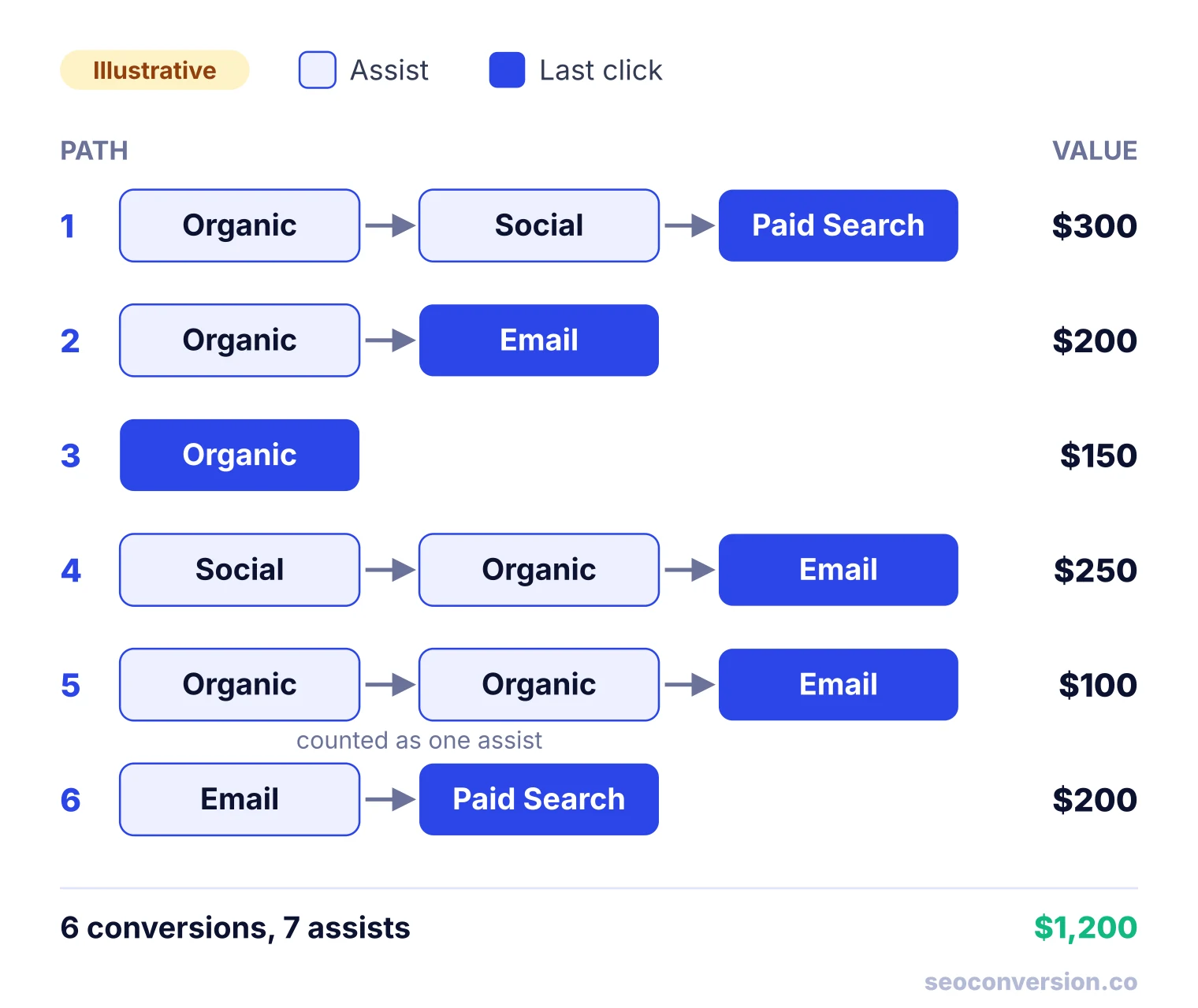
Now go channel by channel. For each one, count the paths it closed and the paths it assisted:
- Organic Search closed path 3 ($150). It assisted paths 1, 2, 4 and 5: 4 assisted conversions worth $300 + $200 + $250 + $100 = $850.
- Email closed paths 2, 4 and 5 ($200 + $250 + $100 = $550). It assisted path 6: 1 assisted conversion worth $200.
- Paid Search closed paths 1 and 6 ($300 + $200 = $500). It assisted nothing.
- Social closed nothing. It assisted paths 1 and 4: 2 assisted conversions worth $300 + $250 = $550.
| Channel | Last-click conv. | Last-click value | Assisted conv. | Assisted value | Assisted / last click |
|---|---|---|---|---|---|
| Organic Search | 1 | $150 | 4 | $850 | 4.00 |
| 3 | $550 | 1 | $200 | 0.33 | |
| Paid Search | 2 | $500 | 0 | $0 | 0.00 |
| Social | 0 | $0 | 2 | $550 | No last clicks |
| Total | 6 | $1,200 | 7 | $1,600 |
Three things to notice in that table:
- The last-click columns add up to reality: 6 conversions and $1,200. Each conversion has exactly one last click.
- The assisted columns do not: 7 assists on 6 conversions, and $1,600 of assisted value on $1,200 of revenue. Paths 1 and 4 each had two assisting channels, so their value is counted twice.
- Social looks worthless under last click and Organic Search looks like a $150 channel, yet one or both touched every path except path 6.
What organic search is worth depends on the question
For comparison, run the same paths through a linear model, which splits each conversion equally across its touches. Organic gets a third of path 1 ($100), half of path 2 ($100), all of path 3 ($150), a third of path 4 ($83.33) and two thirds of path 5 ($66.67). That totals $500 of credited value, or 2.83 conversions.
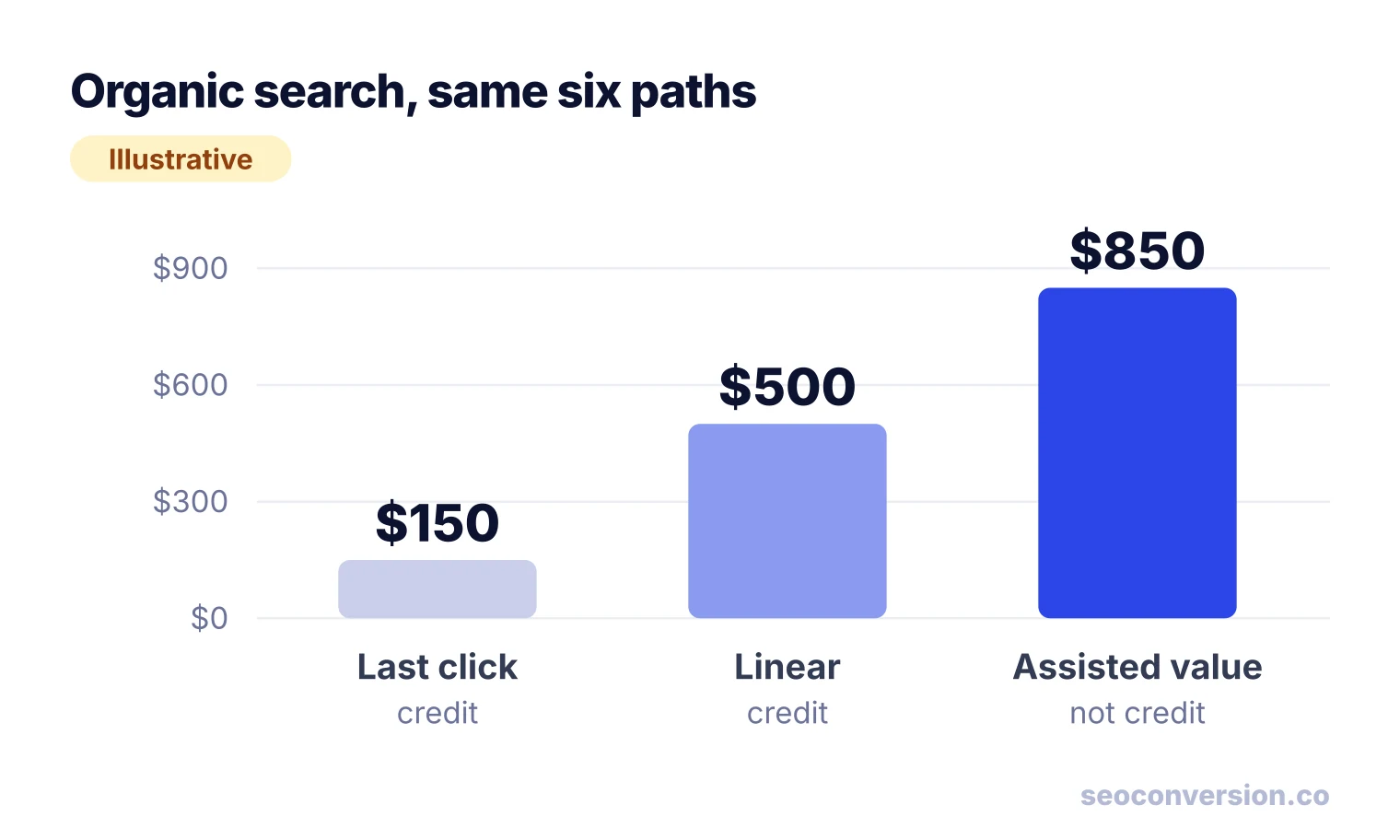
Same channel, same six sales: $150, $500 or $850. None of them is “the” value of organic search. Last click is the floor, assisted value is the ceiling of what the channel touched, and a multi-touch model sits in between.
The Assisted/Last Click Ratio
The classic way to summarize a channel’s role is one division:
A ratio near 0 means the channel almost always closes. Around 1, it assists about as often as it closes. Above 1, it mostly assists. In the example, Organic Search scores 4.00 (an opener), Email 0.33 and Paid Search 0 (closers). Social has no last clicks, so the ratio cannot be calculated: it is a pure assister.
| Ratio | Role | Typical channels | What to do |
|---|---|---|---|
| About 0 | Closer | Branded search, cart email, retargeting | Judge on last click. Ask whether it creates sales or only collects them. |
| 0.5 to 1.5 | Both | Non-branded search, newsletters | Last click and a multi-touch model will roughly agree. Either works. |
| Above 1.5 | Assister | Blog content, comparison pages, social | Never cut it on last click alone. Report its assisted value next to last-click value. |
| No last clicks | Pure assister | Podcasts, video, upper-funnel social | Before cutting it, pause it in one region or period and watch total conversions. |
The cutoffs are rules of thumb, not standards. Compare the ratio of the same channel over time and against your other channels, rather than against someone else’s numbers.
Where the Assisted Conversions Report Went: Universal Analytics to GA4
Most articles about assisted conversions describe the Universal Analytics menu: Conversions, then Multi-Channel Funnels, then Assisted Conversions. That report showed assisted conversions, assisted value, last-click conversions and the ratio per channel. Universal Analytics has been shut down, and the report did not come across to Google Analytics 4.
GA4 also narrowed the models. Per Google’s attribution documentation, three remain: data-driven, paid and organic last click, and Google paid channels last click. All of them exclude Direct visits from credit unless the whole path was Direct. First click, linear, time decay and position based are gone, so the linear numbers above are something you now calculate yourself.
The closest GA4 report: Attribution paths
In GA4, open Advertising, then Attribution paths under Attribution. According to Google’s help page for the report, it splits every path into three segments and shows how much credit each channel, source, medium or campaign gets in each:
- Early touchpoints: the first 25% of the path, empty if the path has one touchpoint.
- Mid touchpoints: the middle 50%, empty if the path has fewer than 3 touchpoints.
- Late touchpoints: the last 25%. A one-touch path puts all its credit here.
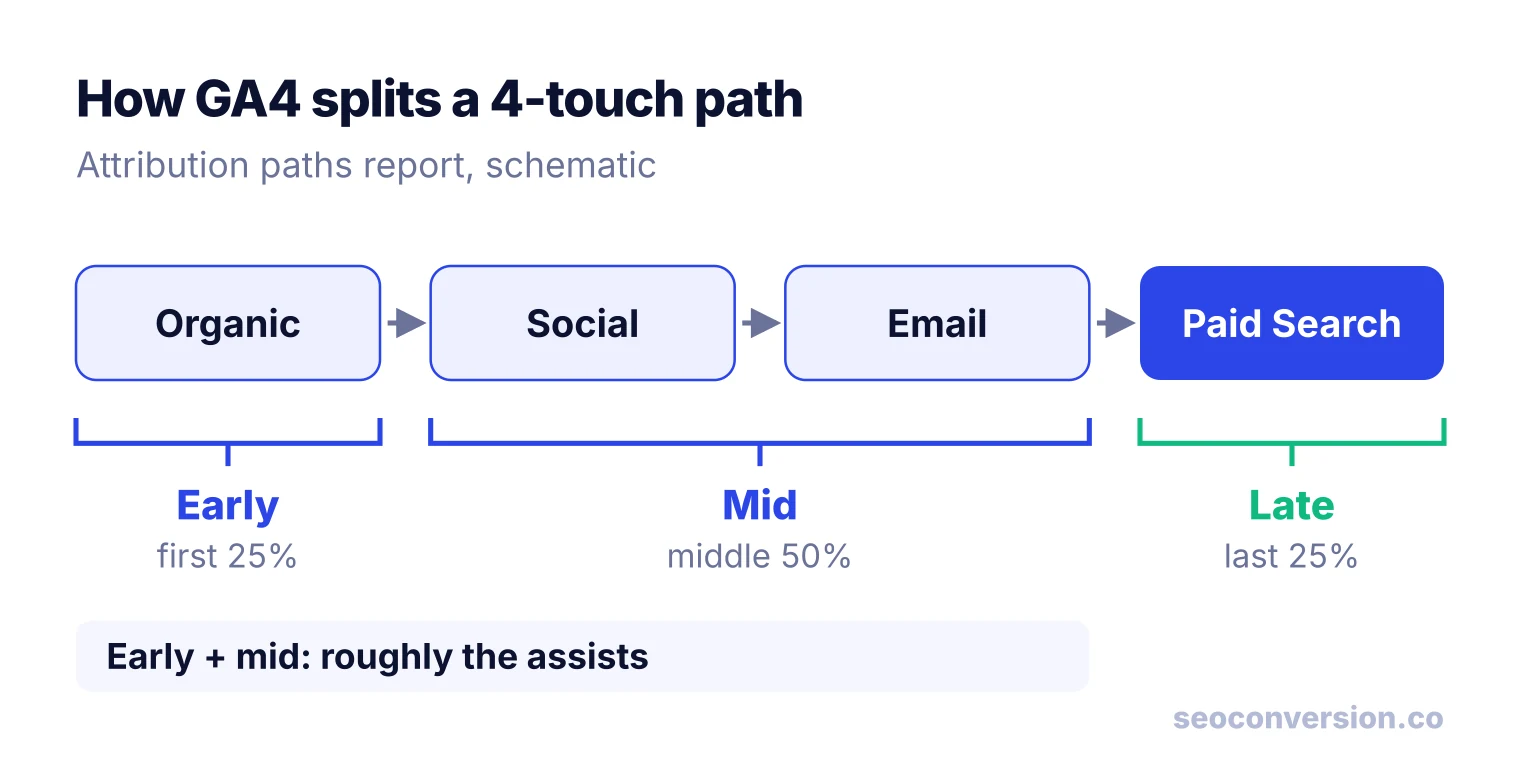
A channel with a lot of credit in the early and mid columns is doing assist work. It is not the same number as UA’s assisted conversions: GA4 shows credit under the model you pick, not a count of conversions touched, and on long paths the late 25% can hold more than one touchpoint. The table below the chart adds key events, purchase revenue, days to key event and touchpoints to key event per path, which replace UA’s time lag and path length reports.
A quick opener check in Explorations
For a fast, rough view, build a free-form exploration with First user default channel group as rows, Session default channel group as columns and Key events (filtered to your conversion) as the value. Cells where the row and column differ are conversions closed by one channel for users another channel first brought in. That shows openers, not mid-path assists, but it takes two minutes.
Assisted Conversions in Google Ads
Google Ads still has a report with the name. Go to Goals, then Attribution, then Assisted conversions. Per Google Ads Help, an ad interaction that helped but was not right before the conversion is a “click and view assist,” and the one right before it is a last click conversion. Because one conversion can have several assisting interactions, assists usually outnumber conversions, the same effect as in the worked example. Path and credit data older than 2 years is deleted.
The catch: Google Ads only sees Google ad interactions. A buyer who read your blog from organic search, then clicked a search ad, shows up as a one-step path. It answers “which campaigns help other campaigns,” not “does SEO assist paid search.”
Do not confuse this report with the Conversions and All conversions columns in your campaign tables. Those show conversions credited to your ads under each conversion action’s attribution model. Neither one is a count of assists.
How to Rebuild Assisted Conversions From GA4 Data
To get true assist counts across every channel, and by landing page, you need the raw events. Link GA4 to BigQuery (Admin, then Product links, then BigQuery links). The export starts from the day you link it, so set it up before you need it. Then:
- Build one row per session: user ID, session ID, start time, the session’s source and medium mapped to a channel, and the landing page (the first page view of the session).
- Mark converting sessions with the key event and its value. If you track leads, give each lead a value first (see how to calculate conversion value).
- Pick a lookback window, such as 30 or 90 days, and for each conversion collect the same user’s earlier sessions inside it.
- Set your rules in writing: whether Direct sessions count as touchpoints (GA4 skips them), and whether a channel that also closed the conversion can be an assist on it.
- Count distinct conversions per channel among the earlier sessions. That is assisted conversions. Sum their values for assisted value.
- Repeat with landing page instead of channel. For SEO this is the useful cut: which organic landing pages start or support paths that end in a sale elsewhere.
Keep the last-click table next to it. Assisted value without last-click value looks inflated, and last-click value without assists hides the openers.
Why Assisted Conversions Matter for SEO and Content
Attribution exists to answer one practical question: where should the next dollar or hour go? Informational content is where last click gives the worst answer. A buyer reads your comparison guide from Google, then comes back through branded search, a newsletter or a direct visit to buy. The guide did the persuading and got nothing.
Assisted conversions fix the most common bad decision, cutting content that “doesn’t convert.” In practice:
- Report organic landing pages with both columns: last-click value and assisted value.
- Treat a page with high assisted value and near-zero last-click value as working, and link it to the pages that close.
- Prune or rewrite pages that have neither, after checking they are not simply new.
For a full approach to crediting content, see content attribution, and for the overall setup our pillar on SEO conversion tracking. If you mainly need the closing side by landing page without a BigQuery project, SEOConversion reports conversions and their value by landing page for organic search and AI assistants.
Why Your Assisted Numbers Are Wrong (and How to Check)
Paths only contain what your tracking can stitch together. These are the usual gaps:
- Direct is ignored. GA4 models give Direct no credit unless the whole path is Direct, so returning visits typed into the address bar vanish from paths. See what direct traffic really contains.
- The lookback window cuts early touches. A blog visit 120 days before a sale is outside a 90-day window and never counts as an assist. Check your attribution window against how long your buyers take.
- Devices and consent break paths. Phone research and laptop purchase look like two people. Visitors who decline analytics cookies, or clear them, start over as new users. Assisting channels used mostly on mobile are undercounted most.
- AI assistants often send no referrer. When someone clicks a link in ChatGPT or another assistant that passes no referrer, the visit is Direct, and its assist disappears. Our AI conversion tracking guide covers which visits can be identified.
- Internal UTM tags create fake touchpoints. UTM parameters on links inside your own site overwrite the real source and add steps that never happened. Tag external links only.
- Assisted value gets summed. Adding assisted value across channels, or adding it to last-click value, double counts. Present it per channel, never as a total.
A quick sanity test: your last-click conversions across channels should match your total conversions for the period, and your assisted count should be at least the number of paths that touch two or more channels. If either fails, fix the tracking before reading the ratio.
Assisted Conversions vs Attribution Models
Assisted conversions are a diagnostic: they tell you a channel is involved. An attribution model, whether last click, linear or data-driven, is an allocation: it splits each conversion so the shares add up to 100%. You need both. Use assists to find channels a last-click report is hiding, then use a model to decide how much they are worth. For how GA4’s machine-learning model shares credit, see data-driven attribution, and for building a report that compares them, see our attribution report guide.
FAQ
Does GA4 have an assisted conversions report?
No. The Assisted Conversions report lived in Universal Analytics under Multi-Channel Funnels and did not move to GA4. The closest GA4 report is Attribution paths, under Advertising, which splits each path into early, mid and late touchpoints. For real assist counts you need Google Ads (ad interactions only) or the GA4 BigQuery export.
What is an assisted conversion in Google Ads?
Google Ads calls it a click and view assist: an ad interaction that happened before a conversion but was not the one right before it. The report sits under Goals, then Attribution, then Assisted conversions. It only sees Google ad interactions, so organic search, email and social never appear on those paths.
Are assisted conversions the same as view-through conversions?
No. A view-through conversion is counted when someone saw an ad, did not click, and converted later. An assist is any earlier touchpoint on the path that was not the last one, clicked or not. In Google Ads an impression can be an assist, which is why the report is labeled click and view assists.
Why am I getting clicks but no conversions?
Check tracking first: fire the conversion yourself and confirm it is recorded. If tracking works, the usual causes are traffic whose intent does not match the page, a weak offer or form, or buyers who convert later through another channel. That last case is exactly what an assisted conversions view shows: the clicks are working, they just are not the last click.
Is a 10% conversion rate considered good?
For a whole website it is high for most businesses. It is normal for narrow goals, such as free sign-ups from warm traffic, or for a single high-intent landing page. If you see 10% on purchases from cold traffic, check for a conversion event that fires twice before you celebrate.
What are the 7 stages of conversion?
There is no standard seven-stage model. Lists with seven, five or four stages are frameworks from individual authors, usually some version of awareness, interest, consideration, intent, evaluation, purchase and loyalty. For assisted conversions the useful split is simpler: early stages produce assists, the final stage produces the last click.
See which landing pages turn search visits into revenue.
SEOConversion tracks conversions from Google, Bing and AI assistants, lets you put a value on each one, and reports that value by landing page.
Start free