
Referral Spam: How to Spot It and Stop It in GA4

Referral spam is fake traffic that shows up in your analytics as visits from a referring website that never sent you a real visitor. Bots either load your pages with a forged referrer or send hits straight to your Google Analytics property, hoping you will see the domain and visit it. In GA4 you stop it with a hostname data filter, report filters for past data and server rules for bots that really hit your site.
Most guides on this topic were written for Universal Analytics, which Google has retired, and many of their fixes no longer exist. This one covers how to recognize spam, how to tell ghost spam from crawler spam, the GA4 settings that work today (and the one that does not), and what spam does to the conversion numbers you actually report on.
What Is Referral Spam?
Normal referral traffic comes from people who click a link on another site. Their browser sends a referrer, the address of the page they came from, and your analytics tool files the visit under that domain. Referral spam fakes that signal. The “visitor” is a script, and the domain in your report is whatever the spammer wants you to read.
The tactic is older than Google Analytics. It began as log spam: many sites once published public pages listing their top referrers, so a bot that requested pages with a fake referrer got a free link printed on someone else’s site. That made it a form of spamdexing, spam aimed at search engines. Once analytics dashboards replaced public log pages, spammers switched targets to the people reading those dashboards.
The two types that matter
- Crawler spam. A bot really requests your pages with a forged Referer header. If it runs JavaScript, your analytics tag fires and records a referral session. It also leaves a line in your server or CDN logs, which is how you can confirm it.
- Ghost spam. The bot never visits your site. It sends hits directly to the analytics collection server using your property’s tag ID, with a made-up referrer and page. Nothing reaches your server, so firewalls and server rules cannot block it.
Older guides also list language spam (fake browser language strings carrying a message) and social spam (fake referrals that mimic social networks). Those are variations in what the fake hit contains, not different delivery methods: each one is either ghost or crawler spam underneath, and the same fixes apply.
How Referral Spam Gets Into Your Analytics
The difference between the two types decides where you can stop them. Crawler spam passes through your website on its way to Google Analytics. Ghost spam goes around it.
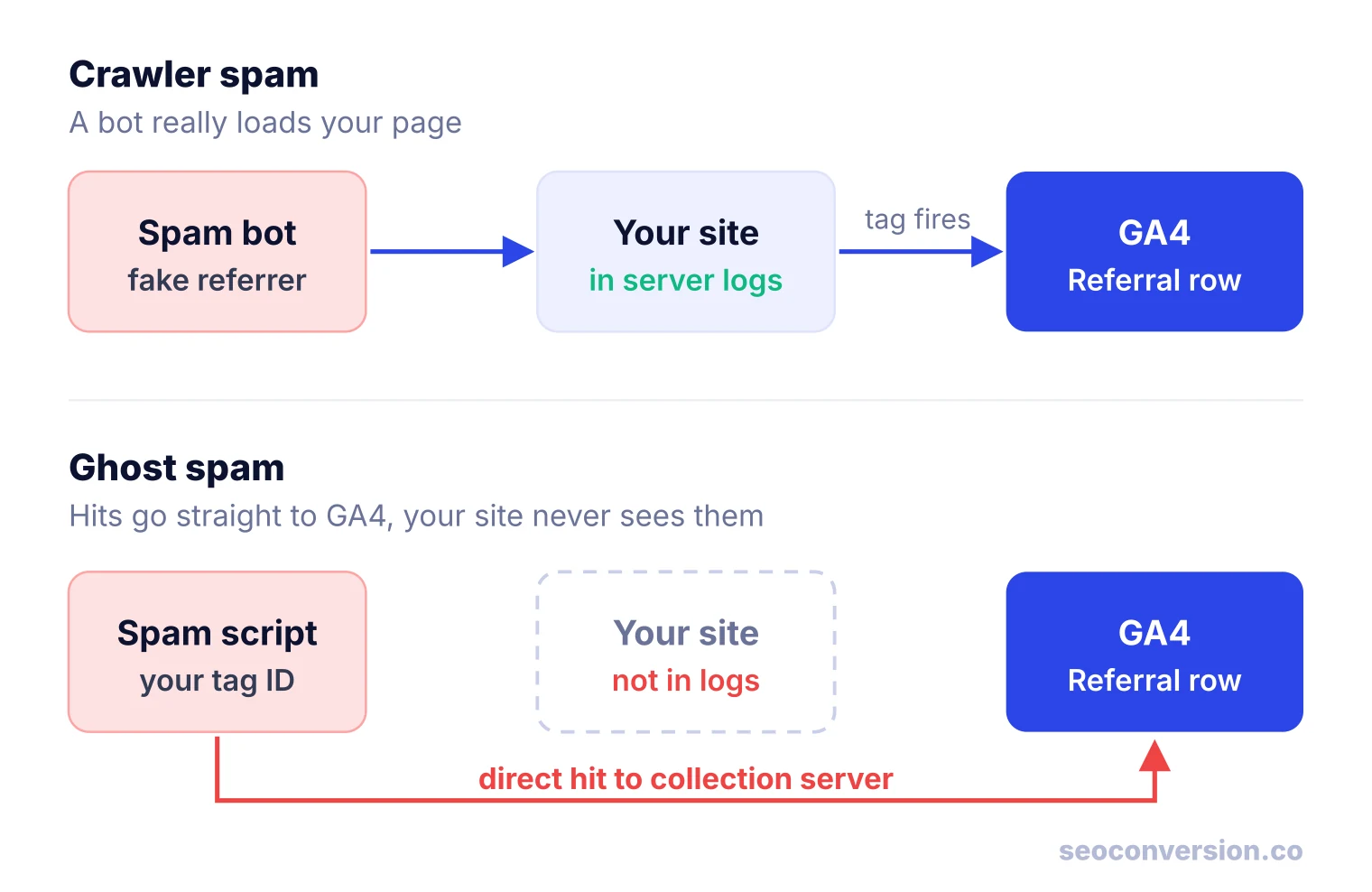
Ghost spam works because the GA4 web tag is public. Your measurement ID (the G- code) sits in your page source, and the browser-side collection endpoint accepts hits that carry it. In the Universal Analytics era, spammers did not even need to find your site: they generated property IDs in the UA- pattern by brute force and fired hits at every valid one. That is why small, brand new sites often got spam before they got real visitors.
Server-side hits are a separate door. GA4’s Measurement Protocol requires an API secret for every request, and Google’s developer documentation warns that exposing that secret in client-side code lets others send spam data to your property. More on that in step 6 below.
Why Spammers Do It
- Curiosity clicks. An unknown domain sending you hundreds of visits is hard to ignore. Every analyst who visits it is a free visitor for the spammer, often counted as engaged traffic they can resell.
- Advertising and affiliate links. Many spam domains redirect to products, “SEO tools” or affiliate offers. The domain name itself is often the ad.
- Scams and malware. Some domains lead to phishing pages or malicious downloads. This is the one real security risk for you.
- Links, historically. The original goal was backlinks from public referrer logs. That only works if you publish your referrer stats on an indexable page, which few sites still do.
Never click a suspicious referrer in your reports to “see who linked to you.” Search the domain name in quotes instead. If the results are other site owners asking about it, or it appears in a public spam list such as the crowdsourced list Matomo maintains, you have your answer without loading the site.
How to Spot Referral Spam in GA4
Start in Reports, Acquisition, Traffic acquisition, and switch the primary dimension to Session source. Sort by sessions and look at each referral source you do not recognize. No single metric proves spam. A real referral can have a short visit, and a new partner can send only new users. Look for several signals together:
| Signal | Typical of spam | Typical of a real referral |
|---|---|---|
| Domain name | Unknown, odd TLD, or a sales pitch in the name | A site you can find linking to your page |
| Traffic pattern | Sudden spike, then gone within days or weeks | Steady, or a bump that matches a mention or post |
| Engagement | Engagement rate near 0%, average engagement time near 0 seconds | Mixed engagement, some sessions read or click |
| Pages per session | One page, often the home page or a page that does not exist | The page that was linked, then others |
| New vs returning | Nearly all new users | Some returning users over time |
| Hostname | Not your domain, or (not set) | Your own domain |
| Key events | None | Some, in proportion to traffic |
| Technology and geo | One browser version, one city or a language value that is a sentence | Spread across devices and places |
Low engagement alone is not enough. A sudden dip in your overall engagement rate is often the first visible symptom, but bots are only one of several causes. Confirm with the hostname and your logs before you filter anything.
Ghost or Crawler? A Three-Question Triage
The ten top-ranking guides for this topic tell you to filter spam. None tells you how to prove which type you have, which decides whether a hostname filter, a report filter or a server rule will work. Three checks answer it for any suspicious referrer:
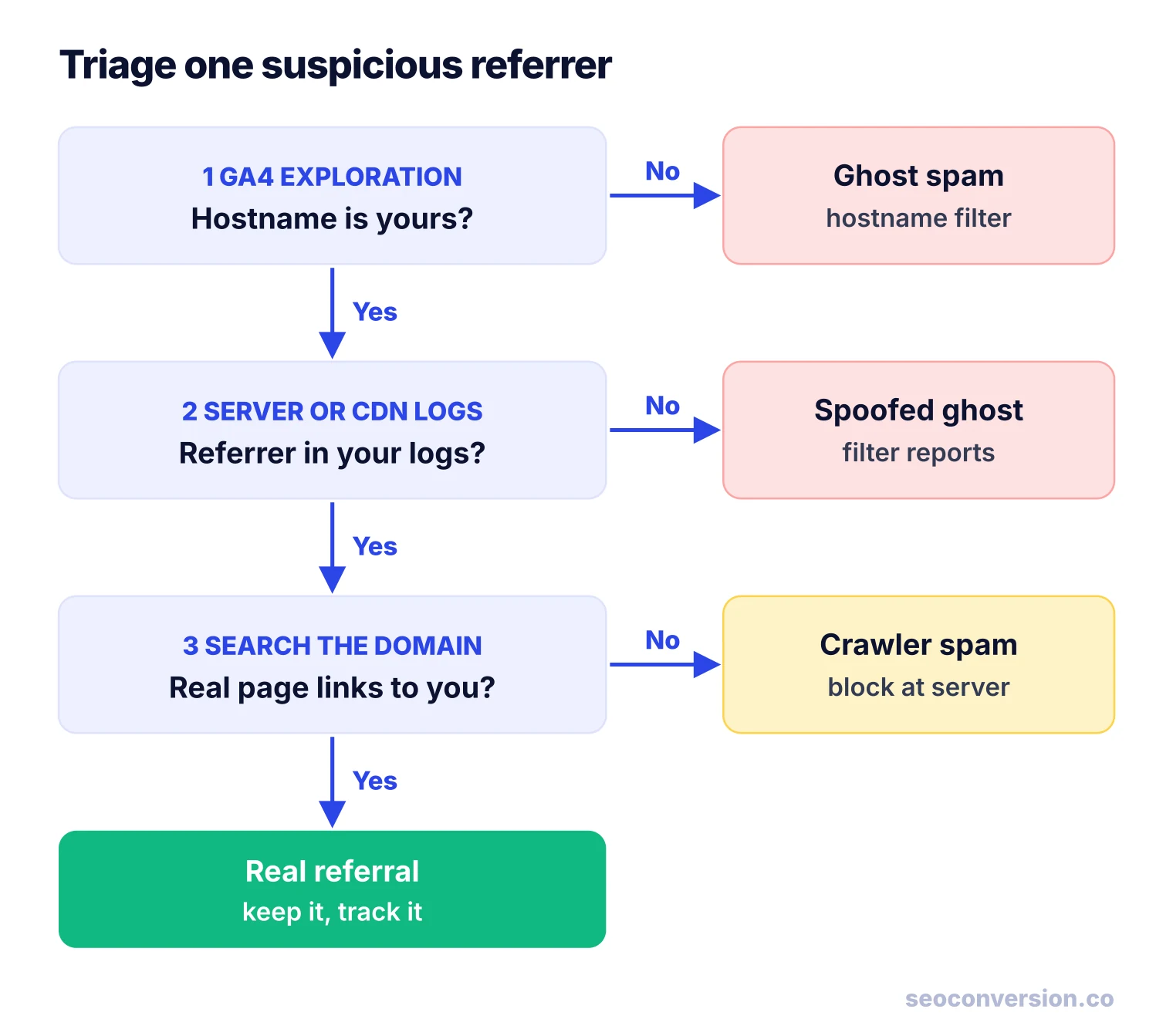
- Is the hostname yours? In Explore, open a Free form exploration. Add Session source and Hostname as dimensions, and Sessions, Engaged sessions and Key events as metrics. Put Session source in rows and Hostname as a nested row. Real visits to your site carry your domain (or a checkout or booking domain you use). Ghost spam often reports a different hostname or
(not set), because the script never loaded your page. If the hostname is wrong, the hostname filter in step 2 below will stop it. - Is the referrer in your server or CDN logs? Search your access logs (or your host’s or CDN’s log viewer) for the spam domain over the same dates. No match means the hits never reached your server: it is ghost spam that guessed or copied your hostname. A hostname filter will not catch it, so you filter it out of reports instead (step 4).
- Does a real page link to you? If the domain is in your logs, search for your URL on that site. If you find no link and the domain matches the signals above, it is crawler spam: block it at the server or CDN (step 5). If you find a genuine link, it is a real referral, even if the visits bounced.
How to Stop Referral Spam in GA4: 7 Steps
Step 1: Know what GA4 already removes
You do not need to tick a bot-filtering box anymore. Google documents that GA4 automatically excludes traffic from known bots and spiders, using Google research and the Interactive Advertising Bureau’s International Spiders and Bots List. You cannot turn it off, and you cannot see how much was excluded. It removes declared, known bots. Spammers who forge a normal browser and change domains every few weeks are not on that list, which is why spam still gets through.
Step 2: Add a web hostname traffic filter
This is the fix most guides say GA4 lacks. GA4 now has a web hostname traffic data filter, the replacement for the old Universal Analytics “include hostname” view filter:
- Go to Admin, then Data collection and modification, then Data filters.
- Click Create filter and choose Web hostname traffic.
- Set the operation to Include only, then add your hostnames with a match type (exactly matches, begins with, ends with or contains). “Ends with”
yourdomain.comcoverswwwand subdomains. Add any third-party hostname where your tag legitimately runs, such as a hosted checkout or booking page. - Save it in the Testing state first. In testing, GA4 tags matching data with a “Test data filter name” dimension instead of dropping it, so you can check in an exploration that no real traffic would be lost.
- Switch it to Active. Google says filtering begins within 24 to 36 hours.
Two warnings. Data filters are not retroactive: they change new data only, and filtered data is gone for good. And an Include only filter with a missing hostname silently deletes real traffic, which is why the testing period matters. An Include only filter is the strongest protection against ghost spam that reports a fake hostname, and it does nothing against spam that sends your real hostname.
Step 3: Do not use List unwanted referrals for spam
The setting under Data streams, Configure tag settings, List unwanted referrals sounds like the answer. It is not. Google explains that matching traffic gets the ignore_referrer parameter, which tells GA4 not to use that referrer as the traffic source. The events are still collected and counted. The spam simply stops being labeled as a referral and usually ends up looking like direct traffic, where it is harder to spot. The setting exists for payment gateways and other domains that send your own visitors back to you.
Some guides say the traffic is “reclassified as direct” and others say it is “hidden from referral reports.” Both are describing the same thing: the sessions stay in your totals. The setting also only acts on hits that pass through your tag, so ghost hits sent straight to Google never carry it.
Step 4: Filter spam out of past data in your reports
Nothing in GA4 deletes spam that is already in your property. You can keep it out of what you read and share:
- Standard reports: add a filter or comparison where Session source does not match regex your spam list.
- Explorations: build a session segment that excludes those sources, and apply it to every exploration you report from.
- Looker Studio: add a report-level filter with the same regex, so every chart in a dashboard inherits it.
A regex for two spam domains looks like this. Add a pipe and the next domain as new ones appear:
Step 5: Block crawler spam at the server or CDN
For referrers that appear in your logs, return a 403 before the page (and your tag) ever loads. On a CDN or a managed firewall, create a rule that blocks requests whose Referer header contains the domain. On your own server, Apache and Nginx versions look like this:
# Apache (.htaccess)
RewriteEngine On
RewriteCond %{HTTP_REFERER} spam-example\.com [NC,OR]
RewriteCond %{HTTP_REFERER} another-spam\.example [NC]
RewriteRule .* - [F]

# Nginx (inside the server block)
if ($http_referer ~* "(spam-example\.com|another-spam\.example)") {
    return 403;
}
Keep expectations realistic. Server rules do nothing against ghost spam, since those hits never reach you. Spammers rotate domains, so a hand-kept list goes stale. Back up the config before you edit it, because a typo in .htaccess can take the site down. If spam volume is high enough to load your server, a bot-management rule at the CDN is a better tool than a growing list of domains.
Step 6: Keep Measurement Protocol secrets private
If you use the Measurement Protocol to send server-side events, its API secret is the only thing stopping anyone else from writing to your property. Never place it in front-end JavaScript, a mobile app bundle or a public repository. If one has leaked, delete it under Admin, Data streams, your stream, Measurement Protocol API secrets, and create a new one.
Step 7: Annotate the change
Turning on a hostname filter can drop reported sessions overnight. Add an annotation on the day it goes active, and note the regex you use in report filters. Six months later, nobody will mistake the drop for an SEO problem.
Universal Analytics Advice That No Longer Applies
Several of the most visible guides on referral spam date from 2015 and 2016. Their logic still holds, but the settings they point to are gone. One recent guide even says GA4 has no filter for this, which was true before the hostname filter arrived. Here is how the old advice maps to GA4:
| Old Universal Analytics advice | What to do in GA4 |
|---|---|
| Tick "Exclude all hits from known bots and spiders" in View settings | Nothing: known bot exclusion is always on and cannot be changed |
| Create an Include hostname view filter | Create a web hostname traffic data filter (Include only) |
| Keep an unfiltered view as a backup | Views do not exist: use the filter Testing state before activating |
| Exclude filter on Campaign source per spam domain | Report filters, exploration segments or Looker Studio filters |
| Exclude spam by browser version or Flash version | Use as a detection signal in Tech details; filter in reports |
| Add spam to the Referral Exclusion List | Still wrong: List unwanted referrals only ignores the referrer |
| Judge spam by 100% bounce rate | Use engagement rate, engagement time and key events |
What Referral Spam Does to Your Conversion Numbers
The usual complaint is “my traffic numbers are wrong.” The bigger problem is what spam does to the ratios you make decisions with. Spam sessions add to the denominator and almost never add a key event. Here is a worked example with illustrative numbers.
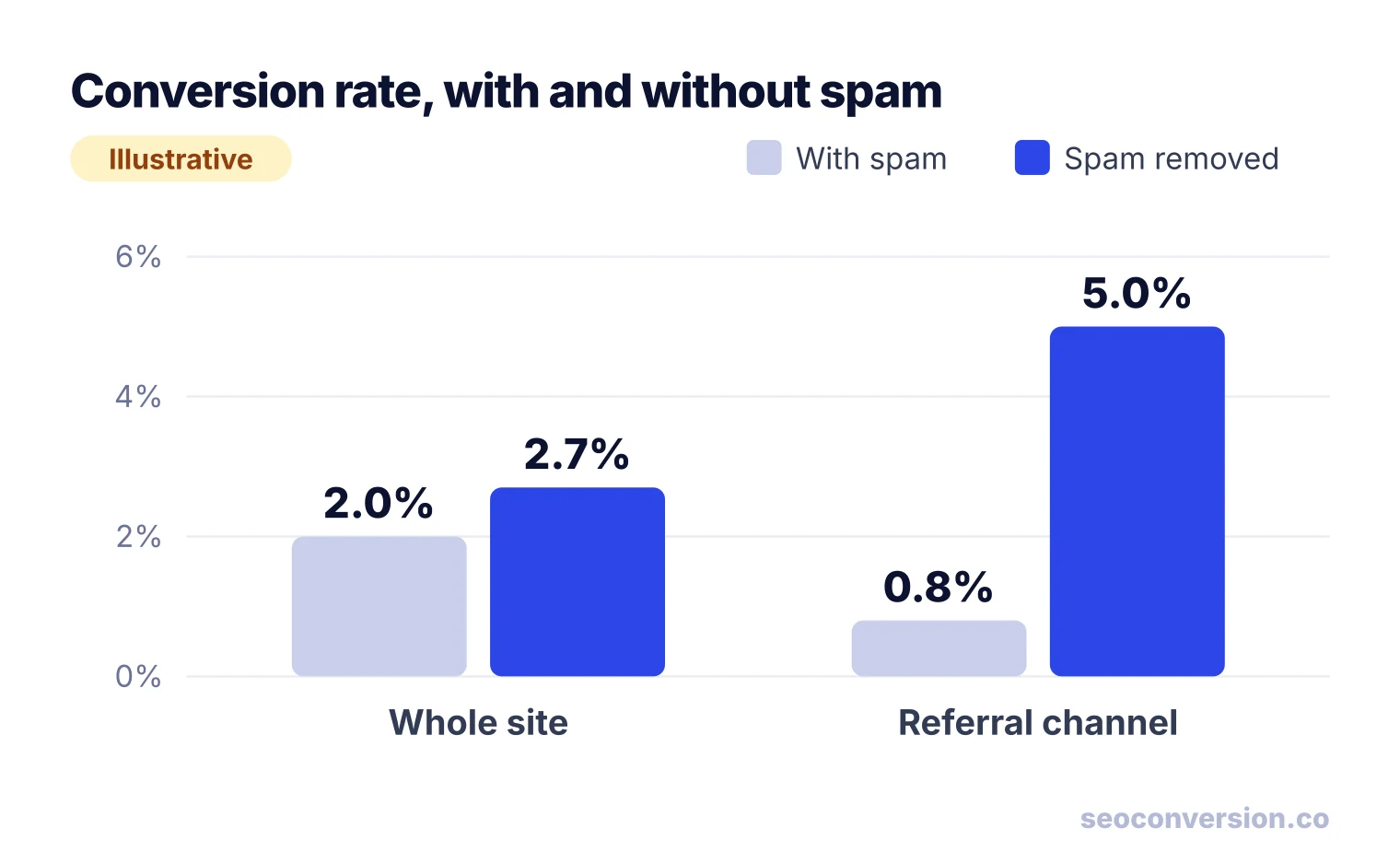
Follow it through to the numbers people act on:
- Total lead value is unchanged. 240 leads at $150 is $36,000 with or without spam. Counts of key events and their value are the metrics spam cannot easily fake.
- Value per session is understated by a quarter. $36,000 ÷ 12,000 = $3.00 reported, against $36,000 ÷ 9,000 = $4.00 real.
- Channel mix is distorted. Referral looks like 30% of sessions (3,600 of 12,000) when it is 6.7% (600 of 9,000), and it looks like your worst-converting channel when it is your best.
The practical rule: when spam is in the data, trust conversions and conversion value by channel and landing page more than any per-session rate. That is how we recommend reading organic performance anyway, as covered in our guide to SEO conversion tracking and to calculating conversion value. SEOConversion takes the same approach for organic search and AI assistants: it reports conversions and the value you assign to them by landing page, rather than leaning on session ratios.
Does Referral Spam Hurt SEO?
No, not directly. The top results disagree here: one security vendor lists “manipulation of SEO” as an impact, while the most upvoted answer on Webmasters Stack Exchange says analytics data is not a ranking factor. The second view fits how search works. Your GA4 property is private to your account; Google’s crawler reads your pages, not your analytics reports. Ghost spam never touches your site at all, so it has no path to your rankings.
Referral spam can still cost you in three indirect ways:
- Bad decisions. If spam lands on one blog post, that page’s engagement and conversion rate collapse in your reports, and you may rewrite or prune a page that was working.
- Server load. Heavy crawler spam uses bandwidth and server time like any bot traffic.
- Public referrer pages. If your site publishes a list of referring sites (an old stats plugin, for example), spam domains end up as links on your own pages. Remove those pages or block them from indexing.
Other “Referral” and “Spam” Questions People Ask
Search results for this topic mix in questions about different things. Briefly:
- SEO spamming is any attempt to manipulate search rankings with deceptive tactics. Google’s spam policies cover link spam, keyword stuffing, cloaking and more. Referrer spam began as one of those tactics.
- Referral marketing is a legitimate program where customers recommend you, usually for a reward. It has nothing to do with referral spam, though its tracked links do show up as referral traffic.
- “Do referrals help at Google?” and “How much does Google pay for referrals?” are about employee job referral programs, not website traffic. They are outside the scope of this guide.
Referral Spam FAQ
What is referral spam?
Referral spam is fake traffic that shows up in your analytics as visits referred by a domain that never actually sent you a visitor. Bots either load your pages with a forged referrer or send hits straight to your analytics property. The goal is to make you curious enough to visit the spammer’s site.
Is referral spam harmful?
It does not touch your rankings, but it damages your data. Spam sessions inflate traffic and drag down conversion rate, engagement rate and value per session, so reports can push you toward wrong decisions. Visiting the spam domains is the real security risk, since some lead to scams or malware.
How do I stop referral spam in GA4?
Create a web hostname traffic data filter set to Include only your own hostnames, test it, then activate it. Filter spam sources out of past reports with a comparison, an exploration segment or a Looker Studio filter. Block crawler spam at your server or CDN, and keep Measurement Protocol API secrets off the client side.
What is referral traffic in Google Analytics?
Referral traffic is visits that arrive by clicking a link on another website, identified by the referring domain in the browser’s Referer header. GA4 groups it in the Referral channel unless the source matches another channel such as search engines or social networks. Referral spam fakes this signal.
What is SEO spamming?
SEO spamming means using deceptive techniques to manipulate search rankings, such as keyword stuffing, cloaking or link schemes. Referrer spam started as one of them: bots faked referrers so that sites publishing their visitor logs would print links to the spammer. Today it mostly targets analytics reports instead.
Should I add spam domains to List unwanted referrals in GA4?
No. That setting only tells GA4 to ignore the referrer for attribution. The spam sessions are still counted, they just stop appearing under that referral source, which makes them harder to find. Use a hostname data filter and report filters instead.
Judge organic traffic by conversions, not sessions.
SEOConversion tracks conversions from organic search and AI assistants with one first-party script, lets you assign a value to each one, and reports conversions and value by landing page.
Start free