
Conversion Goals: Examples, Platform Setup and Realistic Targets

Conversion goals are the specific actions you want visitors to complete on your site, such as a purchase, a lead form, a phone call or a sign-up, defined so a tool can count them. In Google Ads and Microsoft Advertising, a conversion goal is also a setting: a named group of conversion actions (for example “Purchases”) that your campaigns report on and bid toward. Good conversion goals are few, tied to revenue, and carry a dollar value.
This guide covers what counts as a goal, how each platform implements them, primary vs secondary actions, how to set a realistic target with real arithmetic, and the mistakes that quietly break bidding and reports.
What Are Conversion Goals?
A conversion goal turns “is the website working?” into a number. You decide which visitor actions matter to the business, track them, and judge pages, channels and campaigns by how many of those actions they produce. What counts depends entirely on the business: a store cares about orders, a law firm about calls and consultation forms.
Goals come in two tiers:
- Macro (primary) goals: the action the site exists for. A completed purchase, a qualified lead form, a booked demo.
- Micro (supporting) goals: steps that predict a macro goal. Add to cart, newsletter signup, pricing page visit, ebook download.
Averages like time on site or pages per visit are sometimes called goals too, but they are diagnostics, not conversions. Track them separately. If you are still deciding what the site itself is for, start with website goals and come back here to turn them into trackable conversions.
Conversion Goal Examples by Type of Site
| Site type | Macro goal | Micro goals |
|---|---|---|
| Ecommerce | Purchase | Add to cart, begin checkout, back-in-stock signup |
| B2B or SaaS | Demo request, trial start | Pricing page visit, case study download, webinar signup |
| Local service | Phone call, booking form | Directions click, quote calculator use |
| Publisher | Paid subscription | Newsletter signup, account creation |
| Agency or consultant | Contact form, booked call | Portfolio view, guide download |
Each of these is recorded by a conversion event. The goal is the business intent; the event is how the tool sees it happen.
What Each Platform Calls a Conversion Goal
| Platform | Name today | How it works |
|---|---|---|
| Google Analytics 4 | Key events | Any event you mark with the star icon; formerly called conversions, and goals in Universal Analytics |
| Google Ads | Conversion goals | Conversion actions grouped by category; campaigns bid toward the goals you select |
| Microsoft Advertising | Conversion goals | Actions recorded by the UET tag, set up by goal type |
| Search Ads 360 | Floodlight activities | Can be imported into Google Ads as the goals campaigns optimize toward |
GA4 key events
GA4 has no goal object. You mark events as key events in Admin > Events by clicking the star next to the event, or create a new event and mark it as you create it. Google’s Mark events as key events page sets the limit at 30 key events per standard property and 50 on Analytics 360, and lists purchase as a key event by default. Full setup steps are in our GA4 conversion tracking guide.
Microsoft Advertising conversion goals
Microsoft goals sit on top of the UET tag and come in types: destination URL, duration, pages viewed per visit, custom event, app install, offline conversion and in-store transaction. You manage them under Tools > Conversion goals, where an “Include in Conversions” setting decides whether a goal counts in the main Conversions column. If you imported campaigns from Google Ads, check this list: imports bring over goals that may have nothing to do with your Microsoft campaigns.
How Conversion Goals Work in Google Ads
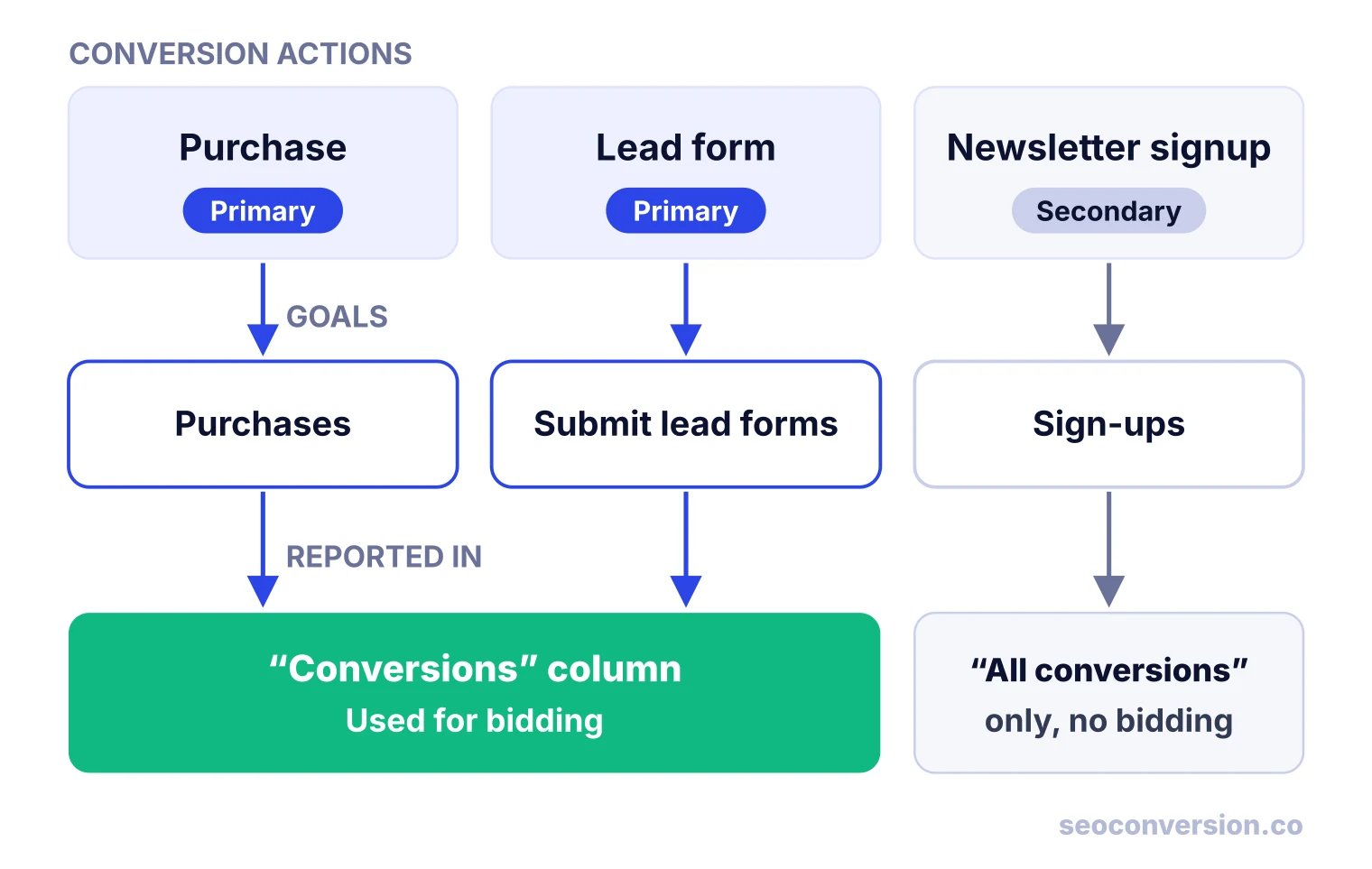
Google Ads groups every conversion action into a standard goal by category, such as Purchases or Submit lead forms. According to Google’s About conversion goals page, an action drives bidding only when two things are true: the action is marked primary, and the campaign optimizes toward the goal that contains it. Goals you set as account-default apply to every campaign automatically. A custom goal can combine actions across categories, and a campaign can use only one custom goal.
Primary and secondary decide what lands where. Google’s page on primary and secondary conversion actions says primary actions appear in the Conversions column and feed bidding, while secondary actions appear only in All conversions and are not used for bidding, unless they are part of a custom goal.
To give one campaign its own goals instead of the account defaults:
- Open Campaigns and select the campaign.
- Open the Settings tab and expand Conversion goals.
- Switch from account-default to campaign-specific goals.
- Select the goals this campaign should optimize toward, then save.
Google notes that Smart Bidding needs a 7 to 14 day learning phase, and that changing conversion goals during that window resets it. Decide your goals before launch and batch any later changes.
Primary or Secondary: A Decision Rule
Most accounts get this wrong by marking everything primary. Decide action by action:
| The action... | Set it as | Why |
|---|---|---|
| Produces revenue or a sales-qualified lead directly | Primary | This is what you want bidding to buy |
| Predicts a macro goal but is cheap and frequent | Secondary | As primary, bidding chases the cheap action instead of buyers |
| Duplicates another primary action (same purchase, two tags) | Secondary or remove | Two primaries double count every sale |
| Matters for a single campaign only | Primary in a campaign-specific goal | Keeps account defaults clean |
| Has fewer conversions than bidding can learn from | Primary, but keep a secondary proxy | Watch the proxy while volume builds |
As a working limit, keep one to three primary goals per account. More than that and the Conversions column becomes a sum of unlike things.
One Campaign With Two Goals, or Two Campaigns?
A common question: phone calls and online purchases are both valuable, so should they share a campaign? If the same searches lead to both, keep one campaign that optimizes toward both goals, and give each action a value so bidding knows which is worth more. Split campaigns only when the keywords and landing pages differ. Two campaigns bidding on the same keywords compete with each other, and the split reports become hard to trust. Google itself recommends aligning campaigns on the same account-default goals where you can.
How to Set Conversion Goals in 6 Steps
- Start from the business outcome. Revenue, qualified pipeline, bookings. Write it down in one sentence.
- List the actions that produce it. Checkout, demo form, call. These are your macro goals.
- Add two or three micro goals that predict the macro goal, and plan to track them as secondary.
- Put a dollar value on each. Use conversion value math: revenue for purchases, expected value for leads.
- Set a target from your own baseline, with a number and a deadline (the worked example below shows how).
- Review monthly. Retire goals nobody acts on, and recheck values against closed revenue each quarter.
Worked Example: A Realistic Conversion Goal Target
“What is a realistic conversion goal?” has no industry answer that fits your site. Build it from your own numbers. All figures below are illustrative.
A B2B software site gets 8,000 organic sessions a month and 96 demo requests, a 1.2% conversion rate. Sales qualifies 40% of demo requests and closes 25% of those, at an average first-year deal of $6,000.
Micro goals get value from how often they end in a demo. If roughly 1 in 40 ebook downloads becomes a demo request, an ebook download is worth $600 ÷ 40 = $15. If 1 in 300 newsletter subscribers does, a signup is worth $2. In a month with 300 signups, 120 downloads and 96 demo requests, that is $600, $1,800 and $57,600 of value.
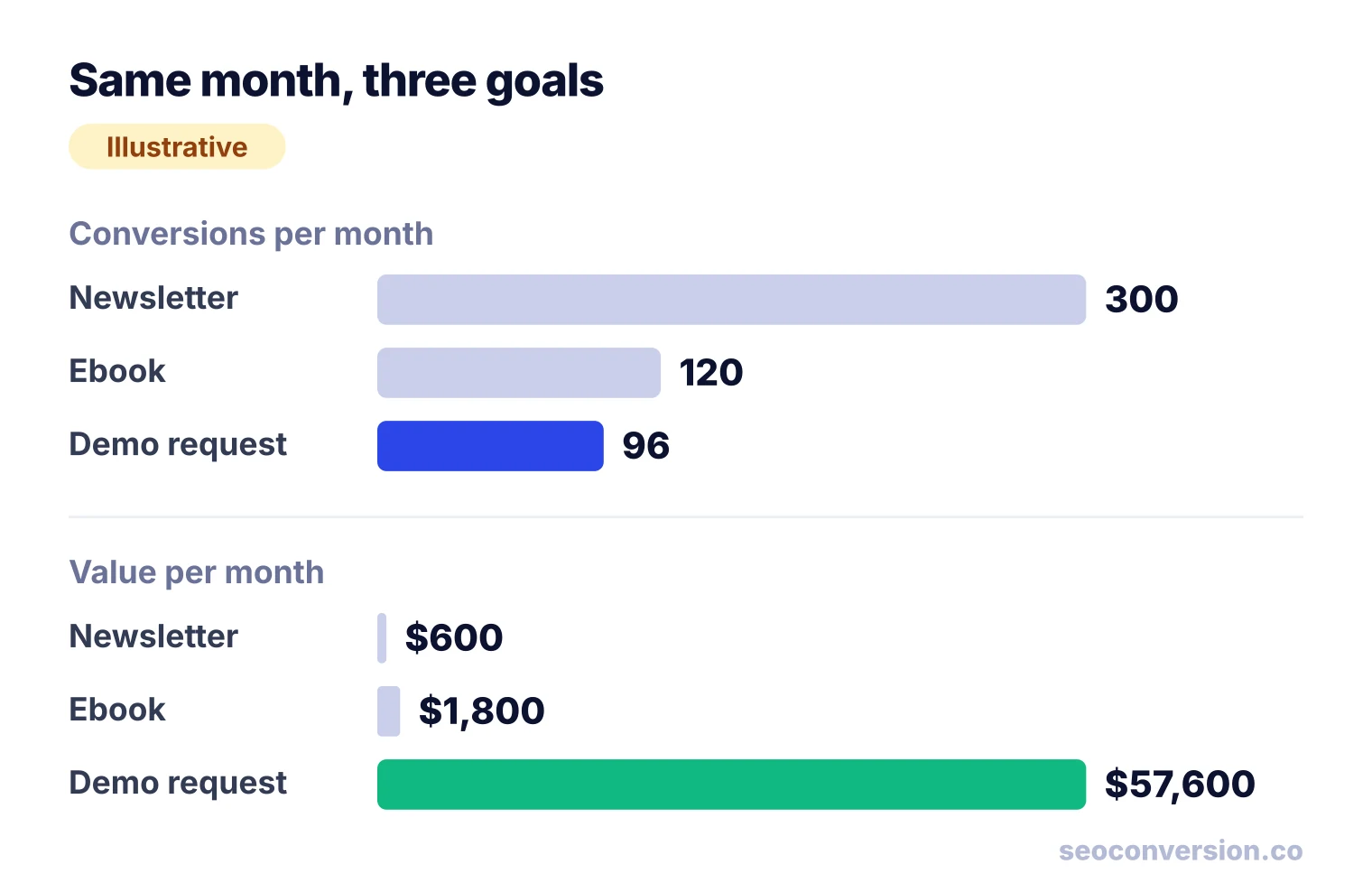
Now the target. A 15% relative lift over a quarter takes the rate from 1.2% to 1.38%. On the same 8,000 sessions that is about 110 demo requests, 14 more a month, worth 14 × $600 = $8,400 a month in expected value. That is a goal you can plan work against and check. If you count all three goals as equal “conversions”, you would celebrate 300 newsletter signups and miss that the real goal barely moved.
Read Conversion Goals by Channel and Landing Page
Ad platforms only see clicks on their own ads. Google Ads optimizes its campaigns toward your goals, but it says nothing about the demo requests that came from organic search or from a link in ChatGPT. Those visitors complete the same goals, so the same goals and values should be read for every channel, and for organic, by landing page, since search engines do not pass the keyword. Our SEO conversion tracking guide shows how to set that up.
SEOConversion does this for organic search and AI assistants: it autocaptures forms, calls, high-intent CTAs and e-commerce events, lets you assign a value to each conversion, and reports conversions and value by landing page and channel.
Conversion Goal Mistakes and How to Fix Them
| Symptom | Likely cause | Fix |
|---|---|---|
| Google Ads shows about twice the sales of your store | Google Ads tag and imported GA4 key event both primary | Keep one as primary, set the other secondary |
| Cost per conversion fell, revenue did not | A micro goal (signup, page view) set as primary | Move it to secondary; bid on the macro goal |
| Performance swings after every edit | Goals changed during the 7 to 14 day learning phase | Batch changes; wait out the learning window |
| One lead shows as three conversions | Lead action counts every conversion | Count one conversion per click for leads |
| Unknown goals in Microsoft Advertising | Imported from Google Ads | Assign a category, then remove them |
| Conversion rate looks great everywhere | A thank-you page goal also fires on direct visits | Trigger on the form submit event instead |
Is a 10% Conversion Rate Good?
It depends on which goal you are dividing by. Ten percent of visitors signing up for a newsletter is ordinary on a content page; ten percent buying is exceptional for most stores. Compare a rate only against the same goal, the same channel and your own past periods. For outside reference points by industry and channel, see average website conversion rates, and read them as rough context, not as a target.
Conversion Strategies That Move Goals
A conversion strategy is a plan to raise one goal, with a hypothesis and a measurement. For example: “Visitors reaching our comparison pages are evaluating vendors, so replacing the newsletter box with a demo offer there should raise demo requests from those pages by 15% in a quarter.” Tactics that usually help:
- Match the offer to the buyer’s stage: guides for early research, comparisons and calculators mid-way, demos and trials at decision.
- Put the macro goal on the pages that already get high-intent traffic, found in your landing page report.
- Cut form fields to what sales actually uses.
- Add click-to-call on mobile for service businesses.
- Test one change at a time, and judge it on goal value, not raw conversion count.
FAQ
What are conversion goals?
Conversion goals are the actions you want visitors to complete, such as a purchase, a lead form, a call or a sign-up, defined so a tool can count them. In Google Ads and Microsoft Advertising, a conversion goal is also a named group of conversion actions that campaigns report on and bid toward. In GA4 the equivalent is a key event.
How many conversion goals should I have?
Keep one to three primary goals that map directly to revenue or qualified leads, and track everything else as secondary. Each extra primary goal dilutes the signal bidding learns from and makes the Conversions column harder to read. GA4 caps you at 30 key events on a standard property, but you should be far below that.
What is the difference between a conversion goal and a conversion action?
A conversion action is one tracked event, like the checkout confirmation or a specific lead form. A conversion goal groups actions of the same category, such as all your purchase actions, so a campaign can optimize toward the whole group. You edit tracking on the action and choose what to optimize on the goal.
What is the easiest conversion goal to set up on a website?
A thank-you page visit after a form submission, or a click on a tel: or mailto: link, because both need no custom code beyond your tag. A newsletter signup is also easy. Easy is not the same as valuable, though: give the goal a value that reflects how often it turns into revenue.
What are the 7 principles of conversion?
There is no single standard list; different authors publish different sets. The principles that hold across them are clarity of the offer, relevance to what the visitor searched, trust, low friction, a clear next step, an offer that matches the buyer’s stage, and measuring the result. The last one is the one most sites skip.
Can I delete a conversion goal in Microsoft Advertising?
You can remove it under Tools > Conversion goals, but a removed goal stays visible in the list with a Removed status. If removal fails with an error about the goal category, open the goal, assign a category, step through the remaining screens, then remove it again.
See which landing pages hit your conversion goals.
SEOConversion tracks conversions from organic search and AI assistants, lets you assign a value to each one, and reports conversions and value by landing page.
Start free