
AI Search Traffic: How AI Answers Change Your Visits and Revenue

AI search traffic is the visits your site gets from AI-generated answers: links clicked in ChatGPT, Perplexity, Gemini, Copilot or Claude, plus clicks from Google’s AI Overviews and AI Mode. For most sites it is still a small share of visits, while the same AI answers reduce the clicks that classic Google results send. So the useful question is not only how much AI traffic you get, but whether it makes up for the value you lose.
This guide covers what counts as AI search traffic, what the research says about its effect on websites, where it shows up (and hides) in your reports, how to tell whether AI is behind a traffic drop, and a worked example that turns lost and gained visits into dollars.
What counts as AI search traffic
Three different things get called “AI traffic,” and mixing them makes every report misleading. Only the first one is traffic in the analytics sense.
| Signal | What it is | Where you see it |
|---|---|---|
| AI search traffic (referrals) | A person clicks a link in an AI answer and lands on your site | GA4 or any analytics tool, when a referrer or UTM tag arrives |
| AI visibility (citations, mentions) | An AI answer cites, links or names your page or brand, whether anyone clicks or not | Search Console generative AI report (Google only), citation tracking tools |
| AI crawler activity | A bot such as OAI-SearchBot, GPTBot or PerplexityBot requests your pages | Server or CDN logs; analytics scripts usually never see it |
A page can be cited thousands of times and send a handful of visits. A crawler can fetch it every day and send none. Keep the three apart: visibility is the cause you hope for, traffic is the measurable effect, and conversions are what pay. Our guides on AI citation tracking and the ChatGPT user agents cover the other two signals.
How AI search is changing your traffic
The clearest independent measurement comes from Pew Research Center’s study of 68,879 Google searches by 900 US adults in March 2025. About 18% of those searches produced an AI summary, and the summary changed what people did next:
- With an AI summary on the page, people clicked a traditional result on 8% of visits. Without one, they clicked on 15%.
- They clicked a link inside the summary itself on just 1% of visits.
- 26% of visits to a page with a summary ended the browsing session, against 16% without one.
- Wikipedia, YouTube and Reddit together made up 15% of the sources cited in summaries, so a few large sites take a big share of the remaining clicks.
So AI search moves traffic in two directions at once. Google’s AI answers absorb clicks that used to reach websites, mostly on informational queries. Assistants like ChatGPT and Perplexity send a new, smaller stream of visits, often from people further along in their research.
Which queries lose clicks
The loss is concentrated where AI answers appear. In the same Pew data, summaries showed up on 8% of one- or two-word searches, 36% of searches written as full sentences, 53% of searches with 10 or more words and 60% of searches starting with a question word (who, what, why, how). Definitions, how-tos and comparisons are exposed. Branded, navigational and transactional searches much less so. Our explainer on what an AI Overview is covers when Google shows one and how it picks sources.
Why sites report such different effects
Published reports range from small declines to publishers losing a large part of their search traffic, and some agencies report most of their clients growing. These are not contradictions so much as different samples: news and how-to publishers depend on exactly the question queries that trigger summaries, while a local service business or a B2B product site lives on searches that rarely do. Your exposure depends on your query mix, which is why the diagnosis below starts from your own Search Console data rather than an industry average.
How much AI search traffic do sites get?
For most sites, visits from AI assistants are still a small fraction of what Google sends, usually well under the share coming from organic search, even though the channel has grown quickly. Several large vendor datasets agree on that direction, though their exact percentages differ by sample, industry and how they classify referrers. Treat any single benchmark as context, not a target.
The more useful number is per visit. A visitor who clicks from an AI answer has usually read a summary already and wants something specific: a product, a price, a tool, a source to check. That is why bottom-of-funnel pages (pricing, comparisons, product and service pages) tend to earn AI clicks while definitions earn citations. Whether those visitors convert better on your site is something to measure, not assume.
Where the studies disagree
Vendor studies have reported AI visitors converting at several times the rate of other channels. Other large datasets found AI visitors viewing fewer pages and bouncing slightly more than search visitors. Both can be true: conversion studies tend to measure retail or high-intent sites, while engagement studies average across every kind of site. Neither tells you about yours. Compare your AI Assistant channel with Organic Search on conversion rate and value per visit, and wait for a sample of a few hundred AI sessions before drawing conclusions.
Where AI search traffic shows up in your reports
This is the part most guides skip, and it explains why AI search traffic looks smaller than it is. Google’s GA4 default channel group sends AI search clicks to three different places:
- Organic Search includes clicks from Google’s AI Overviews and AI Mode. GA4 cannot separate them from regular blue-link clicks, so Google’s AI search traffic is invisible as its own line.
- AI Assistant is a built-in channel for visits from sources like ChatGPT, Gemini, Deepseek, Copilot and Grok. Google does not publish the full list, so check whether Perplexity and Claude still sit under Referral on your property.
- Direct gets any AI visit that arrives with no referrer and no UTM tag: links opened from some apps, copied from an answer, or stripped by the browser. See what Direct traffic means for the other causes.
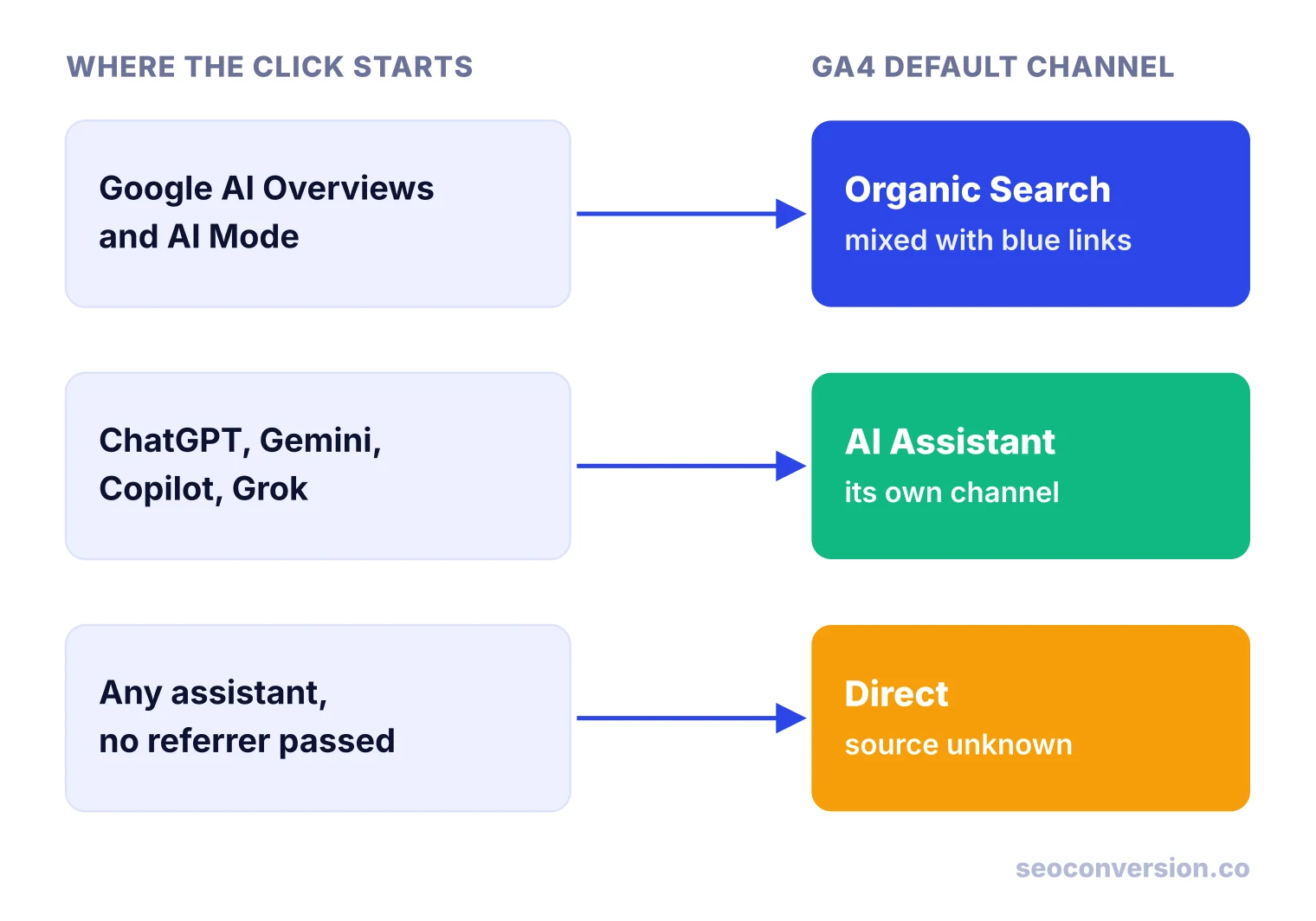
The practical consequence: “AI search traffic” in GA4 means assistant traffic only. Google’s own AI search shows up as a change in organic click-through rate, not as a new source.
How to measure AI search traffic
Use each tool for the question it can answer:
| Question | Where to look | Limit |
|---|---|---|
| How many people clicked from AI assistants? | GA4 Traffic acquisition, AI Assistant channel, then Session source / medium | Misses visits that arrive without a referrer |
| Which pages do they land on, and do they convert? | GA4 exploration: source / medium + landing page + key events | Small samples swing a lot |
| Do my pages appear in AI Overviews and AI Mode? | Search Console generative AI performance report | Impressions only, no clicks |
| Is ChatGPT search the source? | Look for utm_source=chatgpt.com on landing URLs | Only links ChatGPT tags |
| What do AI visitors do on the page? | Session recordings in a tool such as Microsoft Clarity, filtered by referrer | Shows behavior, not value |
| Are AI bots crawling me? | Server or CDN logs filtered by user agent | Bot requests, not people |
The Search Console generative AI performance report counts how often links to your site appeared in AI Overviews and AI Mode, by page, country, device and date. Google says it was rolled out to all websites as of August 31, 2026. It does not report clicks, so pair it with your Organic Search landing page data.
For assistant traffic, a quick check is a free-form GA4 exploration with Session source / medium as the dimension, sessions and key events as metrics, and a “matches regex” filter such as (chatgpt|perplexity|gemini|copilot|claude). Anchor it to domains before you rely on it, because a loose pattern catches unrelated sources. The step-by-step setup, including a tested pattern and a custom channel, is in our guide to AI traffic analytics in GA4. For the ChatGPT tag specifically, see utm_source=chatgpt.com.
Is AI search behind your traffic drop?
AI answers get blamed for every dip, but rankings, demand and broken tracking cause drops too. Compare the same weeks year over year in Search Console for the affected pages, then read the pattern:
| Impressions | Average position | CTR | Most likely cause | Check next |
|---|---|---|---|---|
| Steady or up | Steady | Down | AI answers (or another SERP feature) absorbing clicks | Generative AI report: are these pages getting AI impressions? |
| Down | Steady | Steady | Less demand: seasonality or fewer people searching | Same period last year; Google Trends for the head terms |
| Down | Worse | Down | Ranking loss: update, competitor, technical issue | Indexing, core update dates, which queries moved |
| Steady | Steady | Steady | Not search: GA4 lost the sessions | Tag firing, consent banner changes, Direct rising at the same time |
The first row is the AI pattern: people still see your result, they just stop clicking it. Confirm it page by page. Question-style guides and definitions usually show it first; pricing and product pages rarely do. If the pattern holds only on informational pages that never converted much, the business impact may be small, which is what the next section measures.
Worked example: did AI search cost you money?
Traffic share alone does not answer this. Here is the calculation with illustrative numbers for a B2B site that values each lead at $80 (see how to calculate conversion value to set your own).
| Before | After | |
|---|---|---|
| Google organic visits | 10,000 | 7,600 |
| Google conversion rate | 1.0% | 1.0% |
| Google leads | 100 | 76 |
| AI assistant visits | 0 | 300 |
| AI conversion rate | n/a | 3.0% |
| AI leads | 0 | 9 |
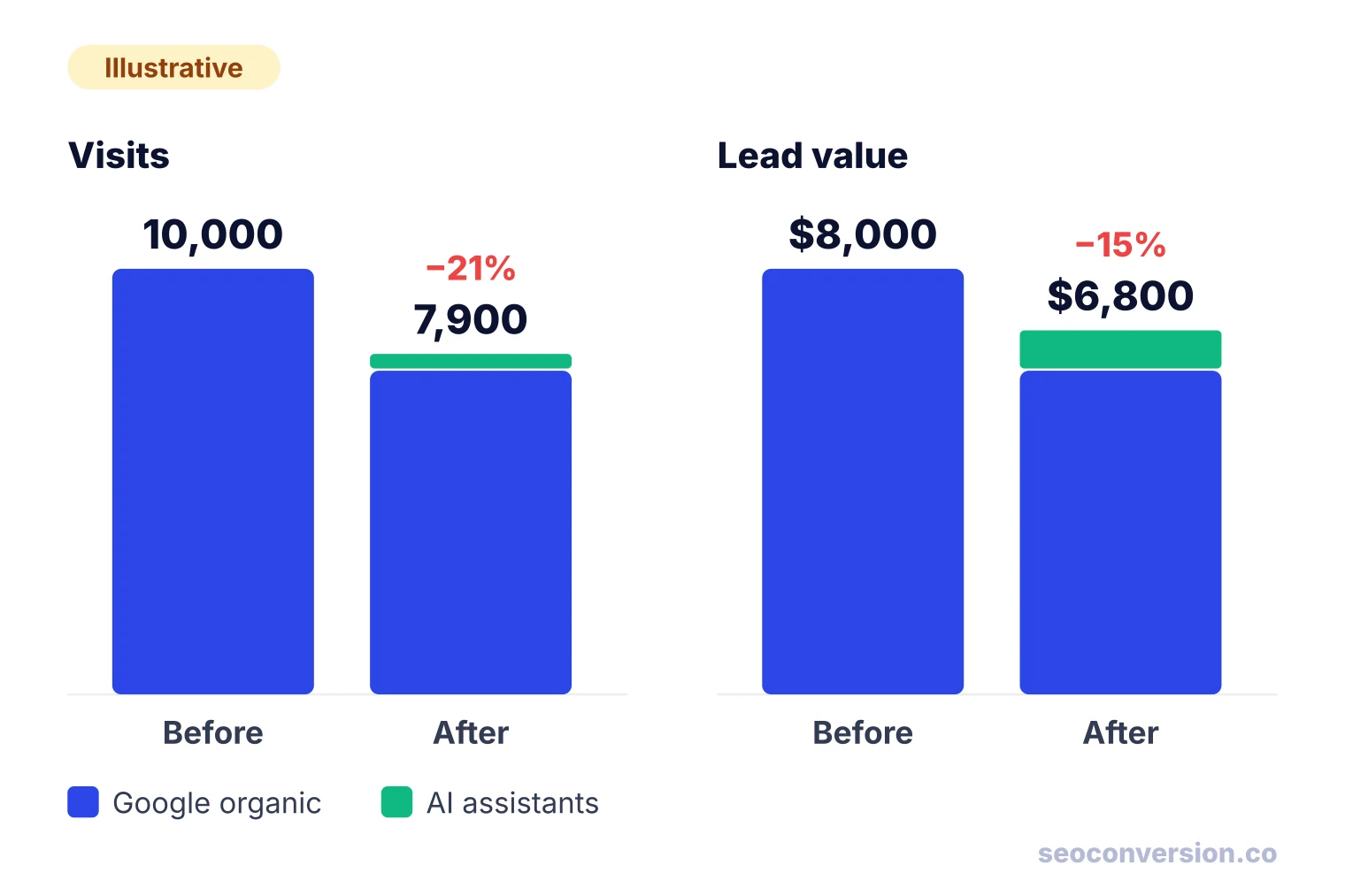
| Total visits | 10,000 | 7,900 (−21%) |
| Total leads | 100 | 85 (−15%) |
| Lead value at $80 | $8,000 | $6,800 (−15%) |
Visits fell 21%, but lead value fell 15%, because the 300 AI visits converted at three times the Google rate in this example. AI search still cost this site $1,200 per period. To see how far it is from breaking even, divide the lost Google leads by the AI conversion rate:
The site needs 800 AI visits to replace what it lost and gets 300. That gap of 500 visits, or 15 leads, is the real size of the problem, and it is a far better target than “get more AI traffic.”
Run the same table with your own numbers, by landing page group. Two variants change the picture. If your AI visitors convert no better than Google visitors, the value loss equals the traffic loss. If the lost clicks were on informational pages with near-zero conversion rates, traffic drops sharply while value barely moves, and that is a reporting problem, not a business one. Tracking conversions from AI assistants is what lets you tell these cases apart.
How to get more traffic from AI search
Google says its AI features rely on the same ranking and quality systems as regular Search, and there is no special markup that earns AI citations. What the top guides agree on comes down to a few habits:
- Answer first. Put the direct answer in the first sentences under each heading, then the detail. Summaries quote clear statements.
- Structure for extraction. Descriptive headings, short paragraphs, lists and HTML tables. Structured data helps regular rich results; it is not an AI shortcut.
- Add what others lack. Original data, worked examples, first-hand testing and clear authorship give an assistant a reason to cite you and a reader a reason to click.
- Earn mentions elsewhere. Assistants lean on third-party sources: reviews, comparisons, industry publications, forums. A brand that only praises itself on its own site rarely gets recommended.
- Build bottom-of-funnel pages. Comparison, pricing and use-case pages match the questions people ask an assistant right before acting. See bottom-of-funnel content.
- Let the search crawlers in. OpenAI says pages need to be open to OAI-SearchBot to appear in ChatGPT search, which is separate from GPTBot (training). Blocking the wrong bot removes you from answers.
- Do not rely on one source. Email, communities and direct relationships reduce your exposure to any single platform’s changes.
For assistant-specific tactics, our guide on how to rank in ChatGPT goes step by step.
Visible in AI answers but getting no traffic?
That is normal: a citation is exposure, and most readers stop at the answer. Check which of your cited pages are informational and whether they link clearly to the pages that convert. Then judge AI search by conversions and value from the visits you can see, not by citation counts. SEOConversion reports conversions and their value from AI assistants and organic search by landing page; when an assistant sends no referrer, the visit stays Direct instead of being guessed.
Frequently asked questions
How do I identify AI traffic?
In GA4, open Traffic acquisition and look at the AI Assistant channel, then switch to Session source / medium and search for chatgpt, perplexity, gemini, copilot and claude to catch what the channel misses. Clicks from Google’s AI Overviews and AI Mode cannot be separated there because GA4 counts them as Organic Search. For those, use the generative AI report in Search Console, which shows impressions only.
Is Google Search traffic declining?
Clicks per search are falling on results pages that show an AI summary. In Pew Research Center’s 2025 study, people clicked a traditional result on 8% of visits to a page with an AI summary versus 15% without one. Whether your own Google traffic falls depends on how many of your queries trigger those summaries, so check impressions, position and CTR in Search Console before blaming AI.
Can I turn off AI on Google?
Not as a setting. Google treats AI Overviews as a core part of Search, so there is no switch to hide them. You can choose the “Web” filter under the search bar after a search to get plain links, and you can avoid AI Mode by not opening it. Site owners can limit what Google shows from their pages with snippet controls such as nosnippet, at the cost of regular snippets too.
What triggers Google AI search?
Google shows an AI Overview when its systems judge a summary useful, which happens far more often on long and question-style queries. Pew found summaries on 8% of one- or two-word searches, 53% of searches with 10 or more words and 60% of searches starting with a question word. Short navigational and brand searches rarely trigger one.
What is the 30% rule for AI?
It is not a Google, OpenAI or industry standard. The phrase circulates with different meanings, most often a rule of thumb about how much of a piece of work should be AI-generated versus human. It has nothing to do with how search engines rank pages or how much traffic AI search sends, so do not plan content or reporting around it.
Measure what AI search traffic is worth, not just how big it is.
SEOConversion tracks conversions and their value from AI assistants and organic search by landing page, with one cookieless script. Visits that arrive without a referrer stay Direct rather than being guessed.
Start free